Windows XP Windows 7 Windows 2003 Windows Vista Windows 綜合教學 Linux 系統教學
Windows 10 Windows 8 Windows 2008 Windows NT Windows Server 電腦軟體教學
您现在的位置: Windows教程網 >> Windows教程 >  >> 電腦軟體教學 >> 電腦軟體介紹

找回 Foxmail 星號密碼:「月影 Foxmail 郵件轉換/密碼恢復器」一鍵顯示明文

編輯:電腦軟體介紹

困境:Foxmail 6.0 只顯示 `*****`,常用星號查看工具失效

作者需在臨時電腦登入網頁版信箱,Foxmail 只見星號,多款星號解碼工具均無效。

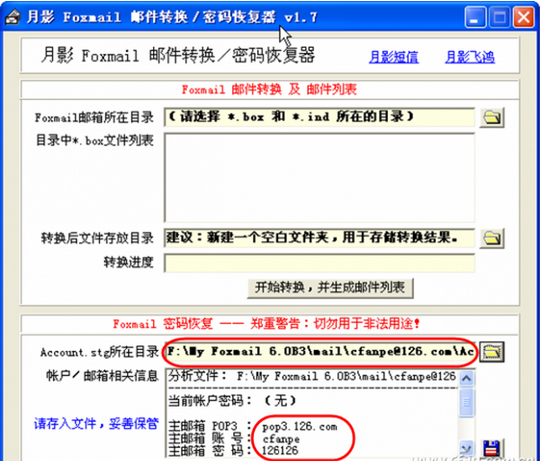
解法:月影 Foxmail 郵件轉換/密碼恢復器 v1.7

  1. 直接執行該工具(免安裝)。
  2. 「Foxmail 密碼恢復」區選擇帳號的 `Account.stg` 所在目錄(通常在 Foxmail 安裝目錄下 `Mail\帳號名\`)。
  3. 選定後自動顯示:密碼、POP3 伺服器等完整資訊。

密碼恢復介面

注意

  • 僅適用於本機已設定帳號的 Foxmail 資料檔。
  • 工具屬「密碼恢復」性質,請合法用於自己帳號,勿用於非法用途。

關鍵時刻救急神器,建議收藏備用。

Copyright © Windows教程網 All Rights Reserved