重要帳號密碼、機密文件不想被發現?利用 NTFS 檔案系統的「替代資料流」(ADS)特性,幾行指令即可將任意資料隱藏於普通檔案之後,檔案大小顯示為 0、雙擊打開內容為空,唯有知曉流名稱者能透過記事本或對應程式讀取,真正做到「隱形不留痕」。
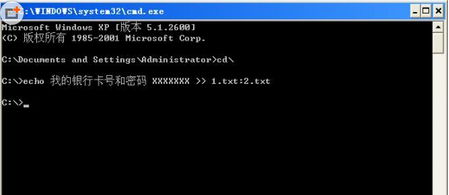
echo 我的銀行卡號和密碼 XXXXXXX >> 1.txt:2.txt
生成 1.txt(大小 0 位元組),實際資料寫入 1.txt:2.txt 流中。讀取:notepad 1.txt:2.txt。同理可隱藏於現有檔案(如 a.pdf:b.doc),不影響原檔正常開啟。
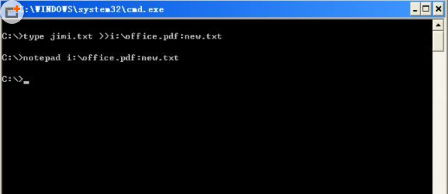
type jimi.txt >> i:\office.pdf:new.txt
將 jimi.txt 寫入 office.pdf:new.txt。讀取需用對應程式:notepad i:\office.pdf:new.txt;圖片則 mspaint hello.def:ly.bmp。副檔名需一致否則無法開啟。
無需額外軟體,資料不加密也能隱形,適合臨時保護機密資訊。