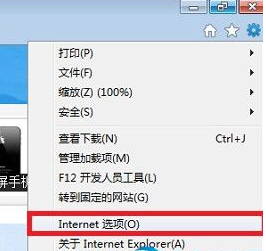
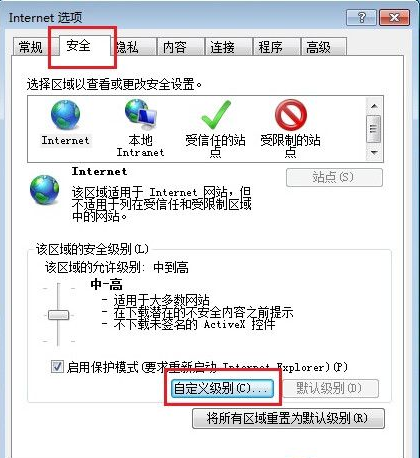
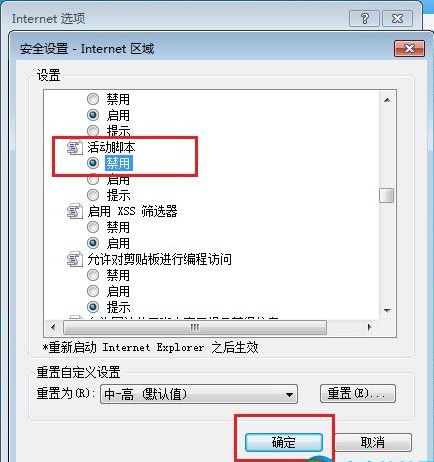
網站為防複製常用 JS 禁用右鍵選單。IE 瀏覽器下,禁用「Active Scripting」即可繞過:
⚠️ 副作用:全域禁用 JS 會導致許多網頁功能異常(表單驗證、動態載入等)。用完建議恢復「啟用」。
替代方案:網頁另存為 .txt 或使用瀏覽器開發者工具 (F12) 複製內容,不影響全域 JS 環境。
WinRAR 每次開啟都跳廣告?建立授權金鑰檔案註冊為正式版移除彈窗
電腦常見 12 類密碼遺忘破解指南(僅供自救參考)
QQ 拼音輸入法輸入韓文:符號面板 → 韓文分頁 → 直接插入
微商 2015 趨勢:向淘寶看齊收費正規化、大品牌入駐重產品輕營銷、80/20 定律下如何選品選隊伍
U 盤熱插拔不丟資料:啟用「快速移除」優化策略設定教學
我的世界礦洞尋找全攻略:聽聲音、挖泥土沙礫、找地牢、32 條實用生存技巧
Word 圖片被切半/文字重疊?段落行距設為「固定值」導致,改單行間距即可
行動硬碟哪個牌子好?2024 選購指南與熱門品牌推薦