IE SmartScreen 會攔截未建立信譽的下載檔案,若確認檔案安全需暫時關閉:

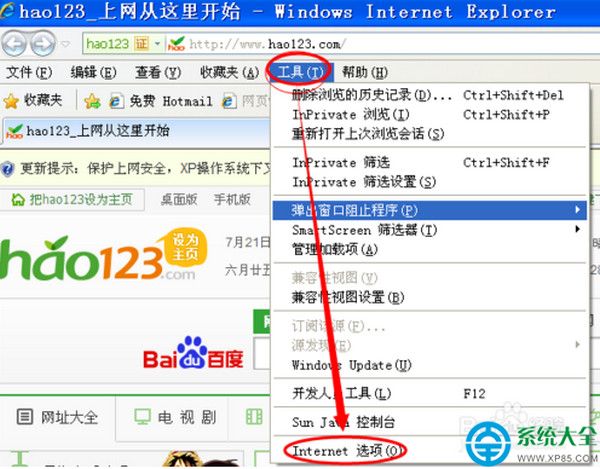
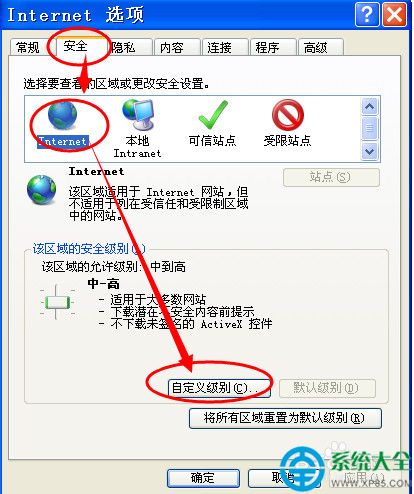
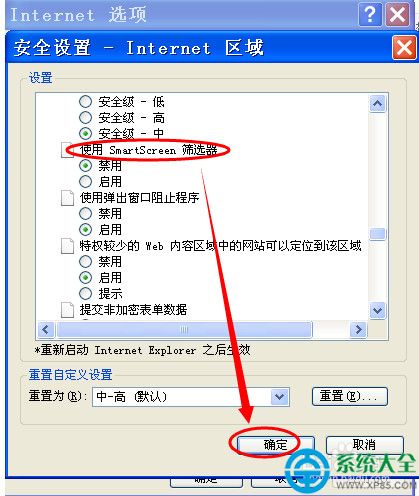
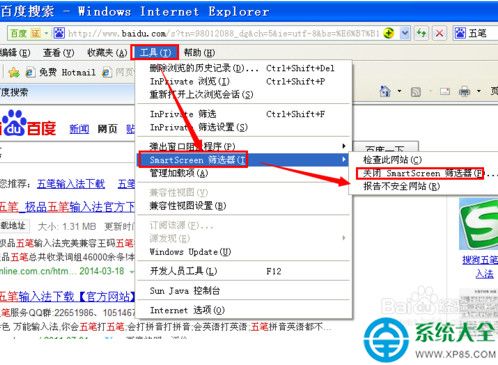
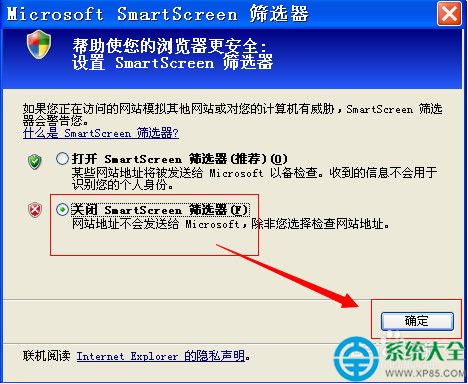
SmartScreen 是重要防禦層,關閉後下載惡意軟體風險大增。建議:僅在確信來源可信時暫時關閉,下載完成後立即重新開啟;長期使用請改用 Chrome/Edge/Firefox 現代瀏覽器,內建更強的 Safe Browsing/Defender SmartScreen 保護。
CF QQ會員國慶狂歡「真情回饋送福利」:每日爆破抽獎、火藥兌換裝備,活動網址
CF 爆破闖關「年輕就是幹」:邀請好友抽獎池,4 位以上好友直送軍用手斧-翔龍+玫瑰手雷
JPG 轉 PDF 最簡單法:Word/WPS 另存為 PDF 即得
WinRAR 建立分卷壓縮包教學:右鍵添加→設定分卷大小→論壇上傳首選 3.5MB 規範
《我的世界》沙漠神殿尋找與探險全攻略:寶藏、陷阱與TNT機關
CFPL S7全明星周末投票抽獎活動:完成投票得抽獎機會,掃碼再得一次
《喪屍圍城1》全流程完美通關攻略:全 Case 觸發時間、BOSS 戰打法、Overtime 模式、True Ending 達成條件完整指南