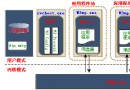
原理:單池多 Worker Process (w3wp.exe),利用多核 CPU 並行處理請求。
適用場景**:CPU 密集型、無共享內存狀態(Session 存 Redis/SQL)、靜態資源多。
不適用**:InProc Session、大量文件鎖/緩存依賴進程內存、COM 組件單線程模型。
設置路徑**:IIS 管理器 → 應用程序池 → 右鍵「高級設置」→「最大工作進程數」。
經驗值**:32 核 32G 內存服務器測試最優值為 5。公式參考:MIN(CPU核心數, 8),避免上下文切換開銷超過收益。
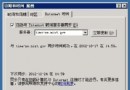
操作**:站點屬性 → 「網站」選項卡 → 取消勾選「啟用日誌記錄」。
替代方案**:啟用 ETW (Event Tracing for Windows) 或 Failed Request Tracing (FREB) 僅記錄錯誤/慢請求,平衡診斷與性能。
<!-- C:\Windows\Microsoft.NET\Framework64\v2.0.50727\CONFIG\machine.config -->
<processModel allowDefinition="Everywhere" />
允許在 Web.config 覆蓋 processModel(注意:.NET 4.0+ 已移除此節點,改用 IIS 管理界面)。
<system.webServer>
  <modules>
    <remove name="OutputCache" />
    <remove name="Session" />                  <!-- 若使用 Redis Session -->
    <remove name="WindowsAuthentication" />      <!-- 非 Windows 認證 -->
    <remove name="FormsAuthentication" />        <!-- 非 Forms 認證 -->
    <remove name="PassportAuthentication" />
    <remove name="RoleManager" />
    <remove name="UrlAuthorization" />
    <remove name="FileAuthorization" />
    <remove name="AnonymousIdentification" />
    <remove name="Profile" />
  </modules>
</system.webServer>原則**:僅保留業務必需模塊。每個模塊都會攔截每個請求,移除無用者可顯著降低 CPU/延遲。
<system.web>
  <pages
    enableViewState="false"           <!-- 不用 ViewState -->
    enableViewStateMac="false"        <!-- 關閉 MAC 校驗 -->
    validateRequest="false"           <!-- 關閉內置 XSS/SQLi 檢查(需自行WAF) -->
    autoEventWireup="false"           <!-- 手動綁定事件 -->
    buffer="true"                     <!-- 保持響應緩衝 -->
  />
</system.web><system.webServer>
<httpErrors errorMode="DetailedLocalOnly" existingResponse="Auto" />
</system.webServer>
<system.web>
<customErrors mode="RemoteOnly" defaultRedirect="/Error.html" />
</system.web>RemoteOnly:本地開發見詳細錯誤,遠程用戶見友好頁面。
<system.web>
  <compilation debug="false" targetFramework="4.8" />
</system.web>
發布時必須 debug="false",否則:禁用編譯優化、產生 PDB 文件、增加內存佔用、阻礙 JIT 內聯。
<system.net>
  <connectionManagement>
    <add address="*" maxconnection="100" />  <!-- 針對所有域名 -->
  </connectionManagement>
  <settings>
    <httpWebRequest useUnsafeHeaderParsing="true" />  <!-- 兼容非標準 Header -->
  </settings>
</system.net>
默認 maxconnection=2 導致高併發外部 API 調用排隊,調大至 100-200 視帶寬/對端限制而定。
<system.web>
  <httpRuntime enableVersionHeader="false" />
</system.web>
移除 X-AspNet-Version、X-Powered-By,減少攻擊面。
<system.webServer>
  <caching enabled="true" enableKernelCache="true" />
  <urlCompression doStaticCompression="true" doDynamicCompression="true" />
  <staticContent>
    <clientCache cacheControlMode="UseMaxAge" cacheControlMaxAge="30.00:00:00" />
  </staticContent>
</system.webServer>| 檢查項 | 工具/命令 | 預期結果 |
|---|---|---|
| 調試關閉 | 瀏覽器 F12 Network → Response Headers | 無 X-AspNet-Version、X-Powered-By |
| 壓縮生效 | curl -H "Accept-Encoding: gzip" -I URL | Content-Encoding: gzip |
| 靜態緩存 | F12 Network → Cache-Control | max-age=2592000 |
| 錯誤頁面 | 訪問不存在頁面 | 顯示 /Error.html,無堆疊信息 |
IIS + ASP.NET 優化核心三板斧:**減少管線攔截(移除模塊)、關閉調試與無用特性、啟用壓縮緩存**。配合應用程序池進程數調優、日誌策略收斂,可在不擴容硬件前提下提升 20-40% 吞吐量。記住:**每個配置變更必須經過預發壓測驗證**,避免因誤關鍵模塊導致業務異常。
雲應用安全事件應急響應全生命週期:從責任界定到取證補救的實戰框架
Windows Server 2003 遠端存取伺服器 (RRAS) 與 VPN 核心概念
Windows Server 2003 + MySQL 每日自動備份、壓縮、清理 5 天前舊檔完整腳本
VPS 安全加固 11 項核心清單:從禁止預設共享到 IIS 權限隔離完整指南
IIS 與 Apache 啟用 SSI (Server Side Includes) 支援 .shtml/.shtm 完整配置指南
Linux 建置 DNS 伺服器實戰 (二):客戶端配置、伺服器分類與 named 核心配置
Windows Server 2008 IIS 部署 WCF 報錯:無法從 System.ServiceModel 載入 HttpModule - aspnet_regiis 修復