Windows 環境部署舊版管理軟體/代理程式時,常因缺少 .NET Framework 2.0 SP2 與 Visual C++ 2008 SP1 Redistributable (x86/x64) 導致安裝靜默失敗或啟動報錯。本文提供系統日誌定位法與標準化運維安裝包。
Application Error / .NET Runtime / SideBySide。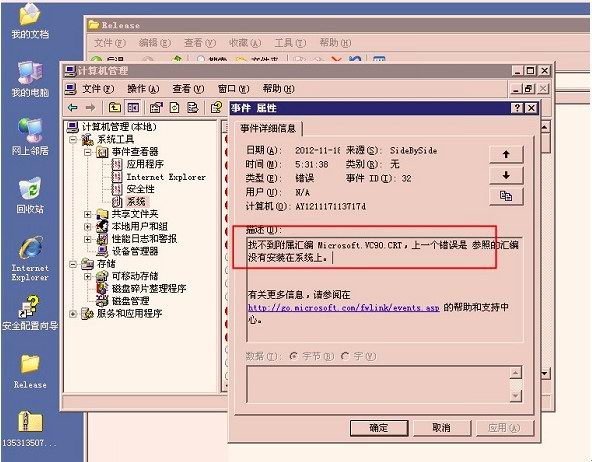
.NET Runtime version 2.0.50727 not found → 缺 .NET 2.0Dependent Assembly Microsoft.VC90.CRT could not be found → 缺 VC9 (VC++ 2008)| 組件 | 下載鏈接 (Microsoft 官方) | 適用場景 |
|---|---|---|
| .NET Framework 2.0 SP2 | Download (x86/x64 同包) | Windows Server 2008/2008 R2 預裝 3.0/3.5,但 2.0 需手動啟用「功能」或安裝此包 |
| Visual C++ 2008 SP1 Redistributable (x86) | Download (vcredist_x86.exe) | 32 位程式 / 64 位系統兼容 32 位程式 (WoW64) |
| Visual C++ 2008 SP1 Redistributable (x64) | Download (vcredist_x64.exe) | 原生 64 位程式 |
$pkgs = @(
  @{Name='NetFx20SP2'; Url='https://download.microsoft.com/download/.../NetFx20SP2_x86.exe'; Args='/q /norestart'},
  @{Name='VC9_x86'; Url='https://download.microsoft.com/download/.../vcredist_x86.exe'; Args='/install /quiet /norestart'},
  @{Name='VC9_x64'; Url='https://download.microsoft.com/download/.../vcredist_x64.exe'; Args='/install /quiet /norestart'}
)
foreach ($p in $pkgs) {
  $installed = Get-ItemProperty HKLM:\Software\Microsoft\Windows\CurrentVersion\Uninstall\* | Where-Object {$_.DisplayName -like "*$($p.Name)*"}
  if (-not $installed) {
    $local = "C:\Temp\$($p.Name).exe"
    Invoke-WebRequest $p.Url -OutFile $local
    Start-Process $local -ArgumentList $p.Args -Wait
  }
}
D:\sources\sxs)。建立標準化「運行庫基線包」納入伺服器初始化模板,從源頭杜絕缺庫安裝失敗。
Squid 日誌過大處理:logrotate 切割與 Squid 自帶 rotate 指令結合方案
Linux/Unix SSHD 服務安全加固 10 大核心配置實戰
FTP 主動/被動模式深度解析:NAT 穿透、防火牆策略與 Serv-U 實戰配置
phpMyAdmin 完整安裝與配置教學:從下載到資料庫管理全攻略
IIS 7/8/10 上傳大文件雙重限制破解:maxRequestLength + requestFiltering 完整配置指南
虛擬化災難恢復八大核心問答:從 P2V 備份到 SRM 部署的實戰指南