快速診斷:誰佔用了 80 埠?
# Windows 命令列
netstat -ano | findstr :80
# 輸出:TCP 0.0.0.0:80 0.0.0.0:0 LISTENING 2448

tasklist | findstr 2448
# 找到進程名稱 (如 httpd.exe、w3wp.exe、Skype.exe)
方案一:修改 IIS 監聽埠 (推薦保留 Apache 80)
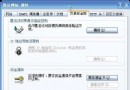
- 開啟「Internet Information Services (IIS) 管理員」
- 左側樹狀圖選中「網站」→「預設網站」
- 右鍵「編輯繫結」/「進階」
- 選中
http、埠 80 →「編輯」
- 埠號改為
81、8080 或其他未用埠
- 確定 → 重新啟動網站
方案二:修改 Apache 監聽埠
# httpd.conf
# 原:Listen 80
Listen 81

# 多埠監聽 (同時支援 81、82)
Listen 81
Listen 82

# 重啟生效
httpd -k restart
方案三:Apache + IIS 共存架構建議
| 架構 | 前端 | 後端 | 優點 |
|---|
| 反向代理 | IIS (80/443) | Apache (8080) | IIS 管理 SSL/靜態/Windows 整合驗證 |
| 反向代理 | Nginx (80/443) | IIS + Apache | Nginx 高併發、統一入口、負載均衡 |
| 不同 IP | IP1:80 → IIS | IP2:80 → Apache | 完全隔離、無埠衝突 |
IIS 反向代理至 Apache 設定 (ARR)
- 安裝 Application Request Routing (ARR) 3.0+
- IIS 管理員 → 伺服器節點 →「Application Request Routing Cache」→「Server Proxy Settings」→ 勾選「Enable proxy」
- 建立 URL 重寫規則:
<rule name="Proxy to Apache" stopProcessing="true">
    <match url="^apache/(.*)" />
    <action type="Rewrite" url="https://localhost:8080/{R:1}" />
</rule>
補充:Apache 啟動警告處理
# 警告:Could not reliably determine the server's fully qualified domain name
# 解決:httpd.conf 添加
ServerName localhost:80
# 或實際域名
ServerName www.example.com:80
Linux 環境同樣適用
# 查詢埠佔用
netstat -tlnp | grep :80
ss -tlnp | grep :80
lsof -i :80

# systemd 管理
systemctl stop httpd
systemctl stop nginx
# 修改配置後
systemctl start httpd