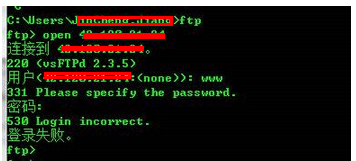
vsftpd 啟動正常,但 FTP 用戶登入提示 530 Login incorrect,日誌無明顯錯誤。匿名登入可能正常,本地用戶均失敗。
Ubuntu 預設啟用 PAM 認證,vsftpd 依賴 /etc/pam.d/vsftpd 進行驗證。若該檔案配置錯誤或缺失必要模組 (如 pam_unix.so),本地用戶無法通過認證。源碼編譯安裝的 vsftpd 不會自動產生此檔,導致衝突。
sudo apt-get remove vsftpd
sudo rm /etc/pam.d/vsftpd
sudo apt-get install vsftpd
重新安裝會生成預設正確的 PAM 配置,本地用戶即可登入。
編輯 /etc/pam.d/vsftpd,確保包含:
auth required pam_unix.so
account required pam_unix.so
並確認 vsftpd.conf 中:
pam_service_name=vsftpd
local_enable=YES
write_enable=YESservice vsftpd restart
# 使用 FTP 客戶端測試本地用戶登入