如何在 Linux 使用 USB 介面儲存裝置?這是各大電腦論壇高頻提問。本文提供完整解決方案,涵蓋 U盤、USB 硬碟盒、數位相機(作大容量儲存模式)。以 Red Hat Linux 7.2 為例逐步演示。
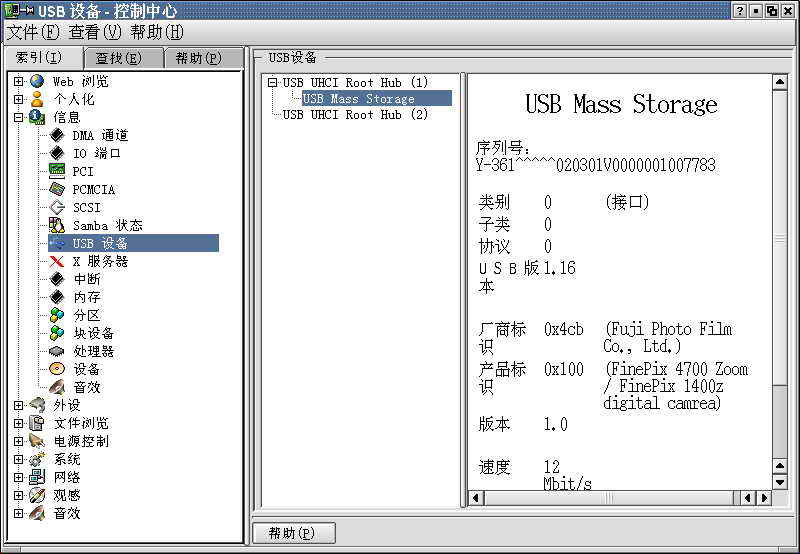
X Window 下開啟「控制中心」→「資訊」→「USB 裝置」,查看是否正確識別。若無資訊,檢查 BIOS 是否啟用 USB 埠、實體連接是否正常。圖 1 顯示筆者 FinePix 數位相機資訊。
終端機執行:
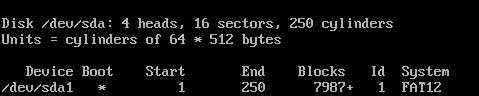
fdisk -l /dev/sda注意:sda 後勿加萬用字元。多 USB 裝置依序為 sda、sdb、sdc...。輸出範例(圖 2)顯示裝置 /dev/sda1、可啟動(Boot 欄 *)、容量 8MB、檔案系統 FAT12。
mkdir /mnt/usb# FAT12/FAT16
mount -t msdos /dev/sda1 /mnt/usb
# FAT32
mount -t vfat /dev/sda1 /mnt/usbls /mnt/usb即可像操作硬碟般複製、刪除檔案。
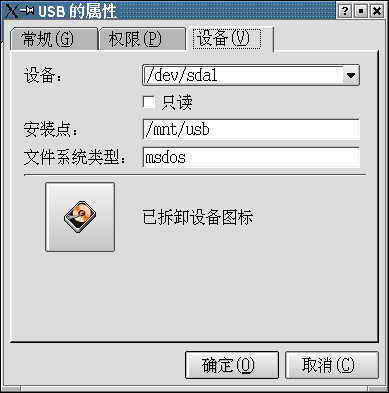
桌面空白處右鍵 → 「新建」→「硬碟」 → 右鍵快捷方式「屬性」→「裝置」分頁,填入:
/dev/sda1/mnt/usbmsdos 或 vfat以後單擊快捷方式即可圖形化存取,如圖 3 所示。