Windows 7 使用 SecureCRT 連線 Red Hat Enterprise Linux 5,中文顯示亂碼。
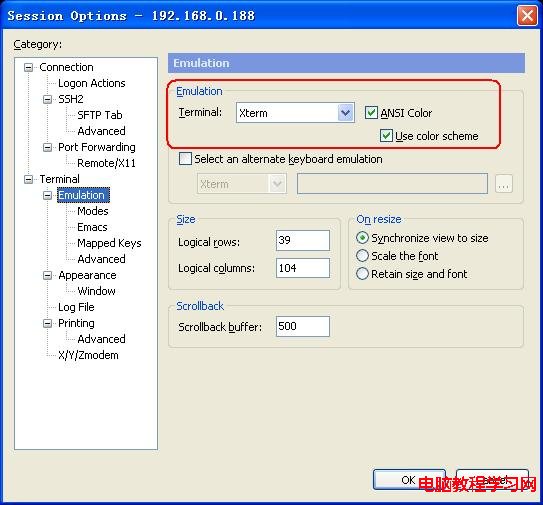
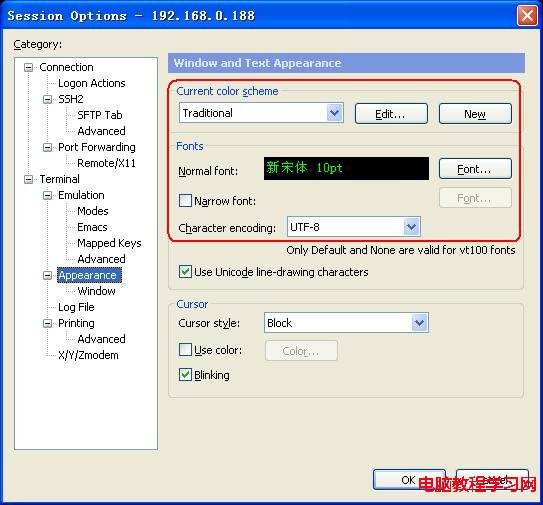
Linux 端與 SecureCRT 端必須採用**相同字元編碼**,現代預設為 UTF-8。
# vi /etc/sysconfig/i18n
LANG="zh_CN.UTF-8"
# 或
LANG="en_US.UTF-8"
修改後重新登入或重開機生效。
Linux 2.6 核心 SSH 預設編碼即為 UTF-8,雙邊設定一致後即可正常顯示中文。
Linux 核心 container_of 巨集原理深度解析與實戰應用
Syslog 集中式日誌伺服器建置與進階應用實戰
Linux 修改文件擁有者與群組:chown 命令用法
Ubuntu 6.06 LTS 下 ADSL PPPoE 撥號上網完整配置指南
Squid 顯示本地時間配置:修改錯誤頁面時間格式
Snort 輕量級入侵偵測系統安裝與規則撰寫實戰指南
CentOS 5.5 修改 Apache 預設端口 80 為自訂端口 (含 SELinux 端口標記)
反彈 Shell 十種姿勢:Bash/Perl/Python/PHP/Ruby/NC/Java 一網打盡