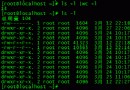
當前用戶未被授權使用 sudo。/etc/sudoers 文件定義了哪些用戶/組可執行 sudo 及具體權限,默認僅 root 及 wheel/sudo 組成員擁有權限。
/etc/sudoers(需 root 權限)su - 輸入 root 密碼。gedit /etc/sudoers(或 vi /etc/sudoers)。root ALL=(ALL) ALL 行,在其下添加:your_username ALL=(ALL) ALLyour_username 替換為實際用戶名)。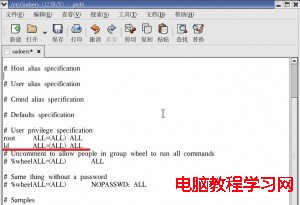
編輯 sudoers 文件添加用戶授權
visudo(推薦,語法檢查+防並發衝突)su -。visudo(注意無空格)。root ALL=(ALL) ALL 下方,按 i 進入插入模式。your_username ALL=(ALL) ALL:x 保存並退出。visudo 會在保存前自動檢查語法,防止寫入錯誤導致 sudo 癱瘓。
su - your_username
sudo ls /root # 應提示輸入密碼並顯示內容用戶名 主機=(目標用戶) 允許的命令
ld ALL=(ALL) ALLALL (第1個) = 所有主機(ALL) = 可切換至任意用戶身份執行ALL (第2個) = 允許執行所有命令如需免密碼:ld ALL=(ALL) NOPASSWD: ALL(生產環境慎用)。
vi /etc/sudoers 未語法檢查,寫入錯誤導致無法 sudo 甚至無法 su(單用戶模式修復)。root ALL=(ALL) ALL 導致 root 自身失權。