Windows XP Windows 7 Windows 2003 Windows Vista Windows 綜合教學 Linux 系統教學
Windows 10 Windows 8 Windows 2008 Windows NT Windows Server 電腦軟體教學
您现在的位置: Windows教程網 >> Windows教程 >  >> Linux 系統教學 >> Linux 教學

IAR 升級後編譯舊專案報錯 __get_PSP 不兼容的解決方案

編輯:Linux 教學

錯誤現象

將 IAR 5.5 專案遷移至 IAR 6.3 編譯時,報錯:

Error[Pe147]: declaration is incompatible with "__interwork __softfp unsigned long __get_PSP(void)" (declared at line 52 of "core_cm3.h")

原因是 CMSIS 核心文件版本不匹配,舊專案包含的 core_cm3.h 與新版 IAR 內建 CMSIS 定義衝突。
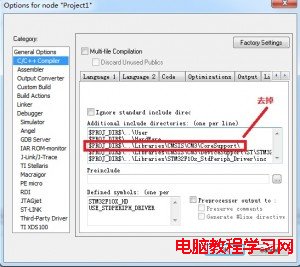
解決步驟

方法一:啟用內建 CMSIS(推薦)

  1. 打開 Project → Options → General Options → Library Configuration。
  2. 勾選 Use CMSIS。
Use CMSIS option

啟用內建 CMSIS 庫

方法二:移除專案中的舊 CMSIS 路徑

  1. 進入 Project → Options → C/C++ Compiler → Preprocessor。
  2. 在 Additional include directories 中刪除類似 $PROJ_DIR$\..\..\..\Libraries\CMSIS\CM3\CoreSupport 的路徑。
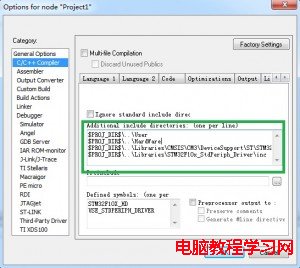
IAR_6.3Set

移除舊 CMSIS 包含路徑後的設置

驗證結果

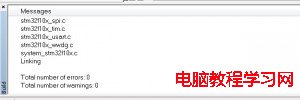
重新編譯,錯誤消失,輸出 Compile OK。

IAR Compile OK

編譯成功

原理說明

  • IAR 6.x 內建了更新版 CMSIS,頭文件中 __get_PSP 等內聯函數簽名已調整(加入 __interwork __softfp 屬性)。
  • 舊專案強制包含舊版 core_cm3.h 導致重複聲明衝突。
  • 啟用 Use CMSIS 後,編譯器自動使用內建版本,忽略專案路徑下的舊文件。

遷移檢查清單

  • 所有 CMSIS 相關頭文件路徑從 Preprocessor 中移除。
  • Library Configuration 中 Use CMSIS 已勾選。
  • 若專案使用特定設備頭文件(如 stm32f10x.h),確保其包含路徑正確且版本匹配。
  • 清理並重建專案(Project → Clean 後 Rebuild All)。
Copyright © Windows教程網 All Rights Reserved