web01.example.com)web02.example.com)https://lb.example.com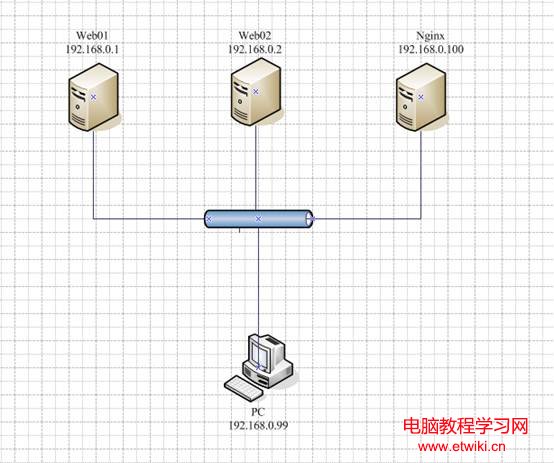
# 兩節點同步操作
systemctl stop firewalld; setenforce 0
mkdir -p /var/www/html
echo "web01.example.com" > /var/www/html/index.html  # Web02 改為 web02.example.com
# httpd 虛擬主機設定
cat > /etc/httpd/conf.d/vhost.conf <<'EOF'
NameVirtualHost *:80

    DocumentRoot /var/www/html
    ServerName web01.example.com
    ErrorLog logs/vhost-error_log
    CustomLog logs/vhost-access_log common

EOF
systemctl restart httpd
# 驗證
curl https://192.168.10.11
curl https://192.168.10.12

yum install -y pcre-devel zlib-devel openssl-devel gcc gcc-c++ make
wget https://nginx.org/download/nginx-1.24.0.tar.gz
tar xzf nginx-1.24.0.tar.gz
cd nginx-1.24.0
./configure --prefix=/usr/local/nginx --with-http_ssl_module --with-http_v2_module --with-http_realip_module --with-http_stub_status_module
make && make install
ln -s /usr/local/nginx/sbin/nginx /usr/sbin/nginxuser nginx;
worker_processes auto;
error_log /var/log/nginx/error.log warn;
pid /var/run/nginx.pid;
events {
worker_connections 1024;
use epoll;
multi_accept on;
}
http {
include mime.types;
default_type application/octet-stream;
log_format main '$remote_addr - $remote_user [$time_local] "$request" '
'$status $body_bytes_sent "$http_referer" '
'"$http_user_agent" "$http_x_forwarded_for"';
access_log /var/log/nginx/access.log main;
sendfile on;
tcp_nopush on;
tcp_nodelay on;
keepalive_timeout 65;
gzip on;
gzip_types text/plain application/xml application/json text/css text/javascript;
# 上游伺服器群組
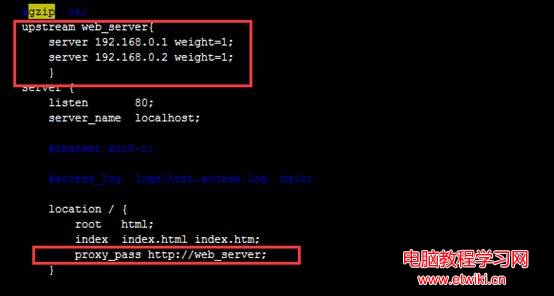
upstream web_cluster {
# 輪詢 (預設)
server 192.168.10.11:80 weight=1 max_fails=2 fail_timeout=10s;
server 192.168.10.12:80 weight=1 max_fails=2 fail_timeout=10s;
# 健康檢查需商業版或第三方模組 (ngx_http_upstream_check_module)
# keepalive 32; # 上游長連線
}
server {
listen 80;
server_name lb.example.com;
location / {
proxy_pass https://web_cluster;
proxy_set_header Host $host;
proxy_set_header X-Real-IP $remote_addr;
proxy_set_header X-Forwarded-For $proxy_add_x_forwarded_for;
proxy_set_header X-Forwarded-Proto $scheme;
proxy_connect_timeout 5s;
proxy_read_timeout 30s;
proxy_send_timeout 30s;
}
location /nginx_status {
stub_status on;
allow 127.0.0.1;
deny all;
}
}
}
systemctl stop firewalld; setenforce 0
nginx -t && nginx
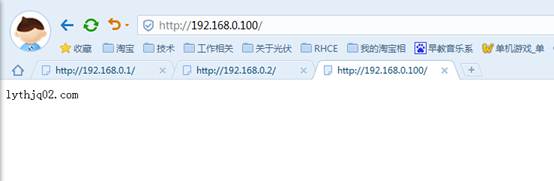
# 多次請求觀察輪詢
for i in {1..6}; do curl -s https://192.168.10.10; done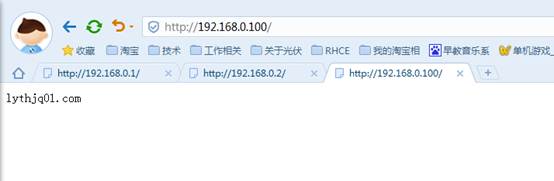
| 項目 | 問題 | 解決方案 |
|---|---|---|
| 健康檢查 | 開源版 Nginx 無主動健檢 | 1. 商業版 Nginx Plus health_check2. 第三方模組 ngx_http_upstream_check_module3. 外掛腳本定時 curl 檢查 + nginx -s reload 動態剔除 |
| Session 共享 | 輪詢導致 Session 丟失 | 1. ip_hash (簡單但不均勻)2. sticky cookie (Plus)3. **推薦**:後端共享 Redis/Memcached Session Store + 應用層無狀態化 |
| SSL 終止 | 後端明文傳輸 | Nginx 終止 SSL (listen 443 ssl),後端 HTTP,憑證統一管理 |
| 靜態資源快取 | 重複請求壓力大 | proxy_cache_path + proxy_cache_valid 快取靜態檔案 |
| 限流/防刷 | 惡意流量 | limit_req_zone + limit_req 限制 IP 請求率 |
| 高可用 | Nginx 單點 | Keepalived/VRRP 雙機熱備 + VIP 漂移 |
本實驗展示最基礎的 upstream 輪詢。生產環境務必解決健康檢查、Session 一致性、SSL 終止、快取、限流、Nginx 自身 HA。建議直接使用 Nginx Plus 或 Ingress Controller (K8s)、API Gateway (Kong/Apisix) 獲得企業級功能與支援。