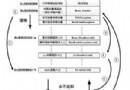
Linux 透過 Samba (Winbind) 與 AD 域控制器通訊,Kerberos 提供認證票據,Oddjob (mkhomedir) 自動建立家目錄,實現帳號密碼統一管理。
# RHEL/CentOS 7/8
yum -y install samba samba-client samba-common samba-winbind samba-winbind-clients \
krb5-workstation krb5-libs pam_krb5 oddjob-mkhomedirsystemctl enable --now smb winbind oddjobd
# 驗證端口
netstat -tulnp | grep -E 'smb|winbind'
# 139, 445 (smb) ; 445 (winbind)# /etc/resolv.conf
search vinda.cn
nameserver 192.168.10.1 # AD DNS 伺服器
# /etc/hosts 確保本機 FQDN 解析
192.168.10.50 linux01.vinda.cn linux01在 AD DNS 新增 A 記錄:linux01.vinda.cn → 192.168.10.50
# /etc/krb5.conf
[libdefaults]
  default_realm = VINDA.CN
  dns_lookup_realm = true
  dns_lookup_kdc = true
  ticket_lifetime = 24h
  renew_lifetime = 7d
  forwardable = true

[realms]
  VINDA.CN = {
    kdc = dc01.vinda.cn
    admin_server = dc01.vinda.cn
  }

[domain_realm]
  .vinda.cn = VINDA.CN
  vinda.cn = VINDA.CN
# 測試取得票據
kinit administrator@VINDA.CN
klist# /etc/samba/smb.conf
[global]
workgroup = VINDA
realm = VINDA.CN
security = ads
dedicated keytab file = /etc/krb5.keytab
kerberos method = secrets and keytab
winbind use default domain = true
winbind offline logon = false
winbind nss info = rfc2307
idmap config * : backend = tdb
idmap config * : range = 10000-20000
idmap config VINDA : backend = rid
idmap config VINDA : range = 10000-20000
template shell = /bin/bash
template homedir = /home/%U# /etc/nsswitch.conf
passwd: files winbind
group: files winbind
shadow: files winbind
# /etc/pam.d/system-auth 及 password-auth 確認含有
auth sufficient pam_winbind.so
account sufficient pam_winbind.so
password sufficient pam_winbind.so
session required pam_mkhomedir.so skel=/etc/skel umask=0022net ads join -U administrator
# 輸入密碼
# 輸出:Joined 'LINUX01' to dns domain 'vinda.cn'# 查看域用戶/群組
wbinfo -u
wbinfo -g
# 測試域帳號登入 (UPN 格式)
ssh test01@vinda.cn@linux01
# 或
su - test01@vinda.cnntpdate dc01.vinda.cn/etc/resolv.conf、AD DNS 記錄kdestroy; kinit administratornet cache flushsetsebool -P allow_ypbind=1 authlogin_nsswitch_use_ldap=1Linux /proc 文件系統詳解:核心數據結構的用戶態窗口
Nginx 高性能優化全攻略:核心配置、內核參數調優與完整實戰模板
Interserver OpenVZ VPS 搭建 VPN 完整實踐記錄
Linux 服務啟動停止管理 (chkconfig 與 rc.d 目錄結構)
CentOS 5/6/7 完整安裝配置 VNC Server 教學(含防火牆、多用戶、系統服務)
Linux C/C++ 連接 MySQL 編譯鏈接完全指南:mysql_config 最佳實踐與常見錯誤排查