將舊伺服器硬盤移至新機器時,若分區為 LVM(Logical Volume Manager)格式,直接 mount /dev/sda2 /opt 會報錯 already mounted or /mnt busy。需先掃描、啟用 LVM 邏輯卷再掛載。
Disk /dev/sda: 500.1 GB
/dev/sda2  Type: 8e Linux LVM
lvm pvscan
lvm vgchange -ay
ls /dev/mapper/
典型輸出:VolGroup00-LogVol00、VolGroup00-LogVol01 等。
lvm lvs
mount /dev/mapper/VolGroup00-LogVol00 /opt
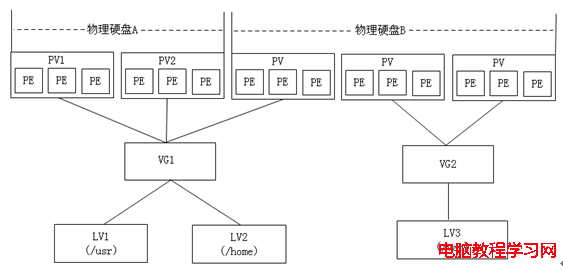
vgchange -ay 無輸出,檢查 /etc/lvm/lvm.conf 中 filter 設定是否阻擋裝置。/etc/fstab,使用 UUID 或 /dev/mapper/... 路徑。LVM 將實體硬盤(PV)彙整為卷組(VG),再切割為邏輯卷(LV),支援線上擴容、快照、跨磁碟條帶化等進階功能,是企業級存儲管理的標準做法。