strace 追蹤進程與核心的互動 (系統呼叫、訊號、進程狀態變更),是排查「為什麼程式掛了、卡住、找不到檔案」的核心工具。
# 追蹤指令執行
strace ls

# 追蹤已運行進程 (PID 1234)
strace -p 1234

# 只追蹤特定系統呼叫
strace -e open,read,write ls

# 輸出時間戳與耗時
strace -tt -T ls

# 輸出到檔案
strace -o trace.log lsls 為例)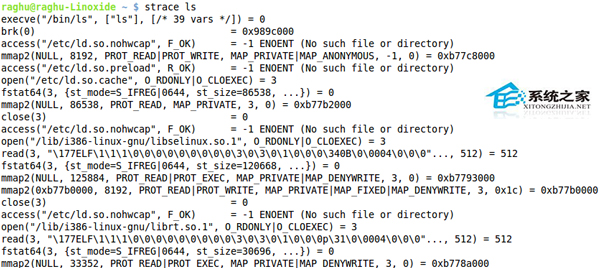


execve("/bin/ls", ["ls"], [/* 環境變數 */]) = 0:程式進入點。open("/lib64/ld-linux-x86-64.so.2", O_RDONLY|O_CLOEXEC) = 3:載入動態連結器。write(1, "file1\nfile2\n", 12) = 12:向標準輸出 (fd=1) 寫入目錄列表。exit_group(0):正常退出。| 現象 | strace 切入點 | 關鍵系統呼叫 |
|---|---|---|
| 程式啟動失敗 | strace -f -e trace=file ./app | open, access, stat (找不到庫/設定檔) |
| 網路連線逾時 | strace -p PID -e trace=network | connect, poll, recvfrom (卡在哪個階段) |
| 權限被拒 | strace -e trace=file ./app | 回傳 EACCES (Permission denied) 的 open/mkdir |
| 效能抖動 | strace -T -tt -o trace.log -p PID | 查看 <... 耗時 ...> 超過閾值的呼叫 |
進階技巧:-f追蹤子進程 (fork/clone);-s 1024增加字串顯示長度;-k顯示堆疊回溯 (需核心支援);結合grep過濾關鍵字:strace -e open ls 2>&1 | grep -i denied。
Linux Cgroups (Control Groups) 安裝、配置與資源限制實戰指南
Ubuntu 系統使用 source 命令讓配置文件立即生效
Zabbix 整合 Telegram 報警機制:安裝客戶端、啟用 API、本地監聽、腳本發送
Ubuntu 截圖完整指南:gnome-screenshot 指令參數、自訂區域截圖快捷鍵、延遲截圖
红旗 Linux 6.0 安装 QQ for Linux (tar.gz 版) 与桌面快捷方式创建
Linux 使用 w 與 uptime 指令查看系統負載 (Load Average) 完整教學