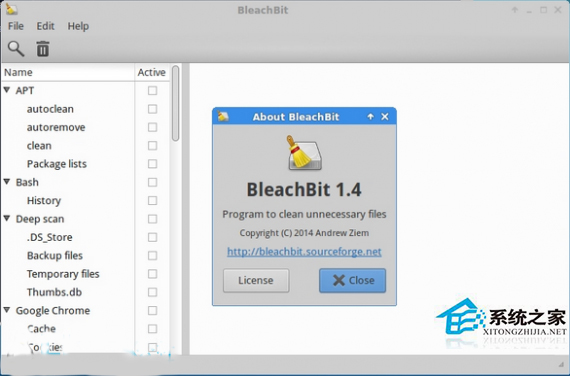
BleachBit 可清理快取、暫存檔、日誌、瀏覽器歷史、縮圖庫等佔用空間的垃圾檔案,並支援檔案粉碎、清理自由空間保護隱私。各發行版安裝指令如下:
Ubuntu / Linux Mint / Elementary OS / Pinguy OS (基於 Ubuntu)
| 版本代號 | 安裝指令 |
|---|
| 14.04 (Trusty) / Mint 17 | sudo apt-get install gdebi
wget https://katana.oooninja.com/bleachbit/sf/bleachbit_1.4_all_ubuntu1404.deb
sudo gdebi bleachbit_1.4_all_ubuntu1404.deb
|
| 12.04 (Precise) / Mint 13 | sudo apt-get install gdebi
wget https://katana.oooninja.com/bleachbit/sf/bleachbit_1.4_all_ubuntu1204.deb
sudo gdebi bleachbit_1.4_all_ubuntu1204.deb
|
| 通用 PPA (較新版本) | sudo add-apt-repository ppa:n-muench/programs-ppa
sudo apt-get update
sudo apt-get install bleachbit
|
Debian 7 (Wheezy)
sudo apt-get install gdebi
wget https://katana.oooninja.com/bleachbit/sf/bleachbit_1.4_all_debian7.deb
sudo gdebi bleachbit_1.4_all_debian7.deb
openSUSE
| 版本 | 指令 |
|---|
| 13.1 | wget https://katana.oooninja.com/bleachbit/sf/bleachbit-1.4-1.1.opensuse131.noarch.rpm
sudo zypper install bleachbit-1.4-1.1.opensuse131.noarch.rpm
|
| 12.3 | wget https://katana.oooninja.com/bleachbit/sf/bleachbit-1.4-1.1.opensuse123.noarch.rpm
sudo zypper install bleachbit-1.4-1.1.opensuse123.noarch.rpm
|
Fedora
| 版本 | 指令 |
|---|
| 20 | wget https://katana.oooninja.com/bleachbit/sf/bleachbit-1.4-1.1.fc20.noarch.rpm
sudo yum install bleachbit-1.4-1.1.fc20.noarch.rpm
|
| 19 | wget https://katana.oooninja.com/bleachbit/sf/bleachbit-1.4-1.1.fc19.noarch.rpm
sudo yum install bleachbit-1.4-1.1.fc19.noarch.rpm
|
CentOS
| 版本 | 指令 |
|---|
| 7 | wget https://katana.oooninja.com/bleachbit/sf/bleachbit-1.4-1.1.centos7.noarch.rpm
sudo yum install bleachbit-1.4-1.1.centos7.noarch.rpm
|
| 6 | wget https://katana.oooninja.com/bleachbit/sf/bleachbit-1.4-1.1.centos6.noarch.rpm
sudo yum install bleachbit-1.4-1.1.centos6.noarch.rpm
|
通用移除指令
# Debian/Ubuntu 系
sudo apt-get remove bleachbit

# openSUSE
sudo zypper remove bleachbit

# Fedora/CentOS
sudo yum remove bleachbit
提示: 官方網站 bleachbit.org/download/linux 提供最新版本連結,建議優先使用發行版官方倉庫或 Flatpak/Snap 版本獲得自動更新。