單張實體網卡可建立多個虛擬介面 (eth0:1, eth0:2...) 各自綁定不同 IP/子網,適用於單機運行多服務、測試多網段環境。本文示範編輯 /etc/network/interfaces 新增 eth0:1、eth0:2 靜態 IP 配置、service networking restart 重啟網路驗證 ifconfig 顯示多介面。子網規劃建議避免重疊,但技術上允許同子網多 IP。
auto eth0
iface eth0 inet static
  address 192.168.1.100
  netmask 255.255.255.0
  gateway 192.168.1.1

auto eth0:1
iface eth0:1 inet static
  address 192.168.2.100
  netmask 255.255.255.0

auto eth0:2
iface eth0:2 inet static
  address 192.168.3.100
netmask 255.255.255.0sudo service networking restart
ifconfig
# 應顯示 eth0, eth0:1, eth0:2 三介面各自 IP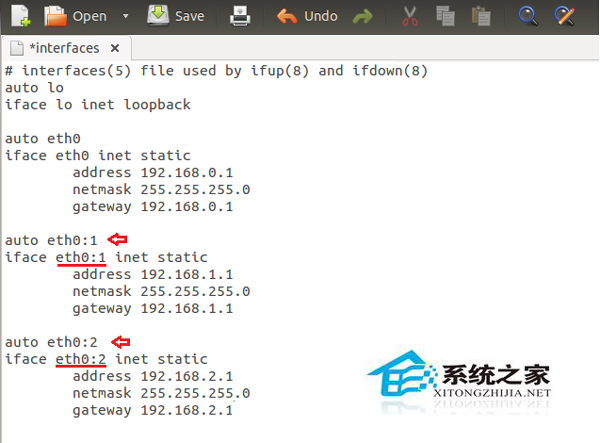
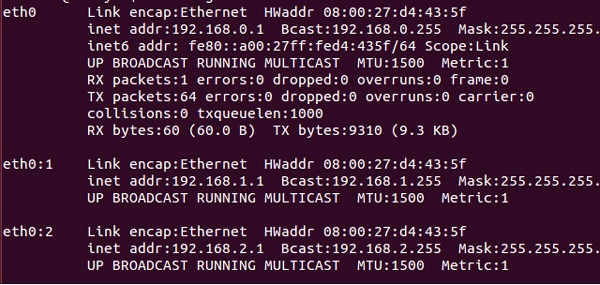
虛擬網卡無需額外硬體,修改網路配置檔即時生效,是單機多 IP 最經濟方案。
Linux 網路設定全攻略:IP 位址配置三大方法與永久生效技巧
Linux 關機與重啟指令全解析:shutdown、halt、reboot、systemctl、init 正確姿勢
Linux 設定 Java 環境變數 JAVA_HOME、PATH、CLASSPATH 的三種方法比較
Linux 無法啟動 Lantern 缺少 libappindicator3.so.1 解決方法
df 與 du 指令實戰:快速查看 Linux 磁碟空間與目錄大小
Ubuntu 關閉螢幕自動鎖定:系統設定 → 亮度與鎖定 → 關閉鎖定選項