C 語言時間處理中,gmtime() 與 localtime() 均將 time_t 轉換為 struct tm,但時區處理不同。本文提供完整 C 程式範例、編譯執行結果與核心差異解析,幫助開發者正確選用。
TZ 環境變數或 /etc/localtime 設定。注意:嵌入式裝置若未正確配置時區,兩者輸出可能相同(皆為 UTC)。
#include
#include

int main(int argc, char **argv) {
    time_t tmpcal_ptr = 0;
    struct tm *tmp_ptr = NULL;

    tmpcal_ptr = time(NULL);
    printf("tmpcal_ptr=%ld\n", tmpcal_ptr);

    tmp_ptr = gmtime(&tmpcal_ptr);
    printf("after gmtime, the time is:\n%d:%d:%d\n",
           tmp_ptr->tm_hour, tmp_ptr->tm_min, tmp_ptr->tm_sec);

    tmp_ptr = localtime(&tmpcal_ptr);
    printf("after localtime, the time is:\n%d:%d:%d\n",
           tmp_ptr->tm_hour, tmp_ptr->tm_min, tmp_ptr->tm_sec);

    return 0;
} gcc time_test.c -o time_test
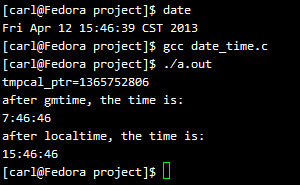
./time_testtmpcal_ptr=1359123456
after gmtime, the time is:
3:37:36
after localtime, the time is:
11:37:36可見 localtime 比 gmtime 多 8 小時(CST = UTC+8)。
/etc/localtime 或 TZ 正確,否則 localtime 會回傳錯誤時間。<chrono> 與 std::put_time,型別安全且支援時區資料庫(C++20 std::chrono::zoned_time)。