Yum 是 RPM 包管理器的前端工具,配置優質的軟件倉庫源能大幅提升包下載速度與安裝成功率。本文詳述在 CentOS 6/7 上替換官方源為國內鏡像源(網易 163、阿里云、清華)的標準流程,含備份、下載 repo 文件、清理緩存、驗證可用性。
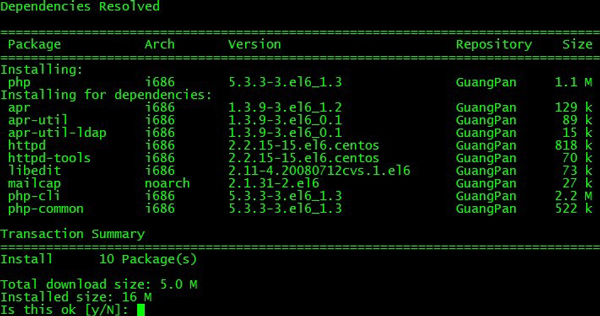
# 1. 備份原有 repo 文件
mkdir -p /etc/yum.repos.d/backup
mv /etc/yum.repos.d/*.repo /etc/yum.repos.d/backup/

# 2. 下載網易 163 CentOS-Base.repo
# CentOS 7
wget -O /etc/yum.repos.d/CentOS-Base.repo https://mirrors.163.com/.help/CentOS7-Base-163.repo
# CentOS 6
# wget -O /etc/yum.repos.d/CentOS-Base.repo https://mirrors.163.com/.help/CentOS6-Base-163.repo
# CentOS 8 / Stream
# wget -O /etc/yum.repos.d/CentOS-Base.repo https://mirrors.163.com/.help/CentOS8-Base-163.repo

# 3. 清理緩存並重建
yum clean all
yum makecache

# 4. 測試
yum list | head -20
yum install -y vim wget net-tools
編輯 /etc/yum.repos.d/CentOS-Base.repo,典型結構如下:
[base]
name=CentOS-$releasever - Base - mirrors.163.com
baseurl=https://mirrors.163.com/centos/$releasever/os/$basearch/
gpgcheck=1
gpgkey=https://mirrors.163.com/centos/RPM-GPG-KEY-CentOS-7

[updates]
name=CentOS-$releasever - Updates - mirrors.163.com
baseurl=https://mirrors.163.com/centos/$releasever/updates/$basearch/
gpgcheck=1
gpgkey=https://mirrors.163.com/centos/RPM-GPG-KEY-CentOS-7

[extras]
name=CentOS-$releasever - Extras - mirrors.163.com
baseurl=https://mirrors.163.com/centos/$releasever/extras/$basearch/
gpgcheck=1
gpgkey=https://mirrors.163.com/centos/RPM-GPG-KEY-CentOS-7

[centosplus]
name=CentOS-$releasever - Plus - mirrors.163.com
baseurl=https://mirrors.163.com/centos/$releasever/centosplus/$basearch/
gpgcheck=1
enabled=0
gpgkey=https://mirrors.163.com/centos/RPM-GPG-KEY-CentOS-7
關鍵變量:
$releasever:自動匹配 CentOS 大版本(6、7、8)。$basearch:自動匹配架構(x86_64、aarch64 等)。gpgcheck=1:驗證 RPM 簽名,保證安全性。enabled=0:默認不啟用(如 centosplus),需時加 --enablerepo=centosplus。| 鏡像站 | Base URL 示例 (CentOS 7) | 特點 |
|---|---|---|
| 網易 163 | https://mirrors.163.com/centos/ | 老牌、穩定、全版本 |
| 阿里云 | https://mirrors.aliyun.com/centos/ | 雲服務器內網極快、同步及時 |
| 清華大學 | https://mirrors.tuna.tsinghua.edu.cn/centos/ | HTTPS 支持、學術網優化 |
| 中科大 | https://mirrors.ustc.edu.cn/centos/ | 教育網/科研網首選 |
| 華為云 | https://mirrors.huaweicloud.com/centos/ | 華為云內網加速 |
替換方法:將 repo 文件中 baseurl 域名部分批量替換,如 sed -i 's|mirror.centos.org|mirrors.aliyun.com|g' /etc/yum.repos.d/*.repo。
# CentOS 7
yum install -y epel-release
# 或手動下載 rpm
# rpm -ivh https://mirrors.aliyun.com/epel/epel-release-latest-7.noarch.rpm

# 替換 EPEL 為阿里云
sed -i 's|^metalink=|#metalink=|g' /etc/yum.repos.d/epel.repo
sed -i 's|^#baseurl=https://download.fedoraproject.org/pub/epel|baseurl=https://mirrors.aliyun.com/epel|g' /etc/yum.repos.d/epel.repo
yum clean all && yum makecache
yum install -y yum-plugin-fastestmirror
# 配置 /etc/yum/pluginconf.d/fastestmirror.conf
# enabled=1
# verbose=1
# socket_timeout=3
# hostfilepath=timedhosts.txt
# maxhostfileage=10
# prefer=mirrors.aliyun.com,mirrors.163.com,mirrors.tuna.tsinghua.edu.cn
| 現象 | 原因 | 解決 |
|---|---|---|
Failed to download metadata | 源地址不可達、DNS 解析失敗 | 檢查網絡、換源、配置 DNS(echo nameserver 223.5.5.5 > /etc/resolv.conf) |
GPG key verification failed | GPG 金鑰缺失或不匹配 | rpm --import https://mirrors.163.com/centos/RPM-GPG-KEY-CentOS-7 |
| 版本不匹配(如 CentOS 8 用 7 的 repo) | $releasever 解析錯誤 | 手動指定 baseurl=.../7/... 或升級 centos-release 包 |
| 內網環境無法訪問公網源 | 無互聯網出口 | 搭建本地 Yum 源(reposync + createrepo + Nginx)或配置代理 |
CentOS 8 官方源已遷移至 vault.centos.org,建議直接遷移至 Rocky Linux 或 AlmaLinux 源:
# 以 Rocky Linux 8 為例
sed -i 's|mirrorlist=|#mirrorlist=|g' /etc/yum.repos.d/Rocky-*.repo
sed -i 's|^#baseurl=https://dl.rockylinux.org|baseurl=https://mirrors.aliyun.com/rockylinux|g' /etc/yum.repos.d/Rocky-*.repo
dnf clean all && dnf makecache
合理配置 Yum 源是 Linux 系統維護的基礎功課,選對鏡像站、啟用 EPEL、裝上 fastestmirror,能讓包管理事半功倍。