Windows XP Windows 7 Windows 2003 Windows Vista Windows 綜合教學 Linux 系統教學
Windows 10 Windows 8 Windows 2008 Windows NT Windows Server 電腦軟體教學
您现在的位置: Windows教程網 >> Windows教程 >  >> Linux 系統教學 >> 關於 Linux

快速查詢當前 Shell 名稱與版本:$$、$0、--version 參數實戰

編輯:關於 Linux

取得當前 Shell 名稱

  1. ps -p $$:顯示 PID 對應的指令名(如 bash)。
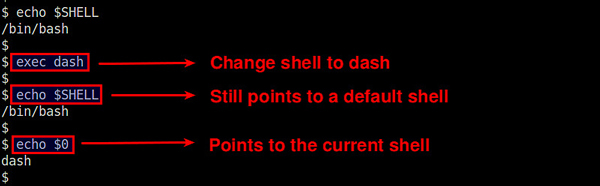
  2. echo $0:直接印出 Shell 程式名(適用 bash、zsh、sh、dash、tcsh)。

勿用 $SHELL:該環境變數固定為預設 Shell 路徑,不反映當前實際執行的 Shell。
查詢版本號

bash --version
zsh --version
tcsh --version

或使用內建變數:echo $BASH_VERSION、echo $ZSH_VERSION。

結語

$$ 或 $0 取名稱,--version 取版本,兩步驟精準掌握當前 Shell 身分。

Copyright © Windows教程網 All Rights Reserved