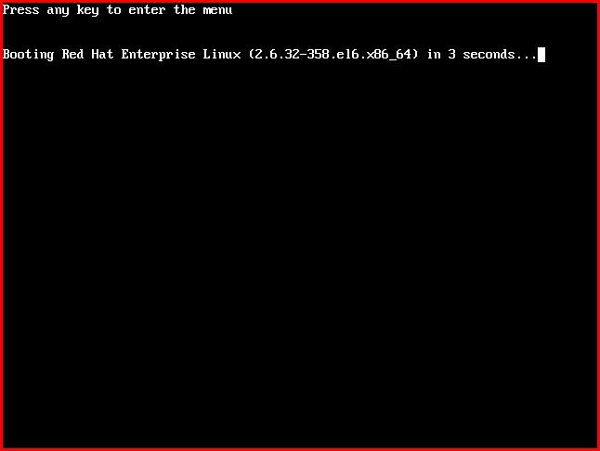
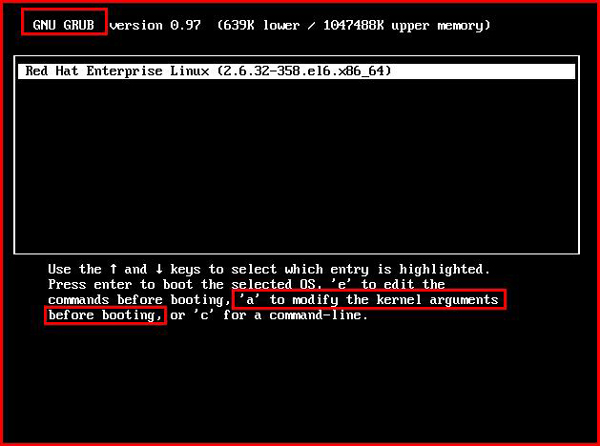
single 或 init=/bin/bash,按 Enter 啟動。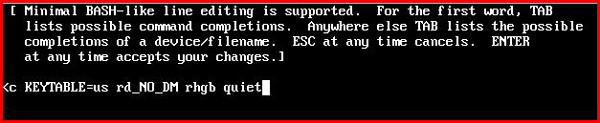
mount -o remount,rw /passwd root → 輸入新密碼兩次。reboot 或 exec /sbin/init。單用戶模式繞過正常登入驗證,配合 passwd 即可快速找回 root 控制權。
Ubuntu 刪除 AVD 模擬器失敗提示「正在使用」?手動刪除 .avd/.ini 檔案解決
Linux 無網路環境離線安裝 GCC:掛載 ISO 建立本地 Yum 源
Linux Git 版本控制完整實戰指南:初始化、分支、衝突、遠端協作
Linux 線上替換運行中文件:避開 cp 陷阱,掌握 mv/rsync 原子性替換之道
Linux 安裝 JITWatch 完整教學:Java JIT 編譯分析工具部署指南
yum.conf 設定檔詳細範本:快取目錄、日誌、鎖定最新版、多倉庫 baseurl 配置
Linux 序列埠 (Serial Port) 程式設計完整指南:termios 結構體配置、波特率、資料位、停止位、奇偶校驗、流控