Windows XP Windows 7 Windows 2003 Windows Vista Windows 綜合教學 Linux 系統教學
Windows 10 Windows 8 Windows 2008 Windows NT Windows Server 電腦軟體教學
您现在的位置: Windows教程網 >> Windows教程 >  >> Linux 系統教學 >> 關於 Linux

UEFI 模式誤刪 GRUB 開機選單?手動引導進系統後重建 ESP 分區啟動項

編輯:關於 Linux

第一階段:手動引導進入 Ubuntu

  1. 準備 Ubuntu Live USB(含 GRUB2)。
  2. 開機選 USB 進 GRUB,按 c 進入命令列。
  3. 假設 /boot 在 (hd0,gpt6),根分區在 (hd0,gpt7):
    set root=(hd0,gpt6)
    linux /vmlinuz... root=/dev/sda7
    initrd /initrd...
    boot
  4. (Tab 可自動補全路徑)

第二階段:重建 ESP 分區 GRUB

  1. 進入系統後 su - 切 root。
  2. grub-install -v(-v 小寫)重建啟動項。
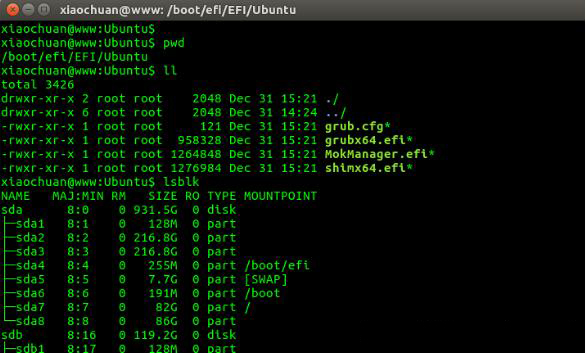
  3. 驗證:掛載 ESP 分區(如 /dev/sda4),確認 /EFI/ubuntu/ 下有 4 個檔案。

第三階段:備份 ESP 分區防患未然

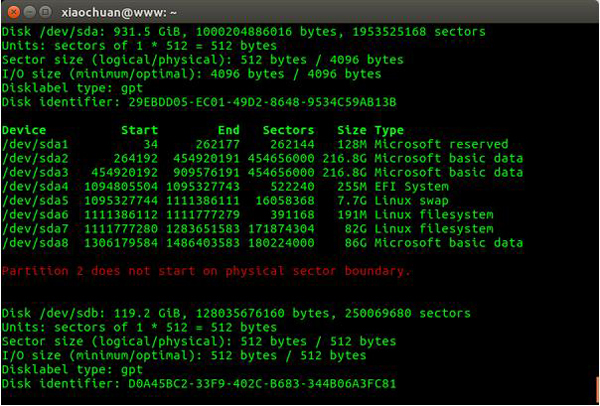
  1. fdisk -u -l 找出 ESP 分區(如 /dev/sda4,Sectors=522240)。
  2. 備份:
    dd if=/dev/sda4 bs=512 count=522240 of=./efi.backup
  3. 未來還原:
    dd if=./efi.backup bs=512 of=/dev/sda4

結語

Live USB 手動引導 → grub-install 重建 → dd 備份 ESP,三步驟徹底解決 UEFI 下 GRUB 遺失問題。

Copyright © Windows教程網 All Rights Reserved