Windows XP Windows 7 Windows 2003 Windows Vista Windows 綜合教學 Linux 系統教學
Windows 10 Windows 8 Windows 2008 Windows NT Windows Server 電腦軟體教學
您现在的位置: Windows教程網 >> Windows教程 >  >> Linux 系統教學 >> 關於 Linux

Linux pppsetup 指令介紹:Slackware 內建 PPP 連線互動式設定工具

編輯:關於 Linux

pppsetup 是 Slackware 發行版內附的 PPP (Point-to-Point Protocol) 連線設定精靈,提供互動式問答介面,引導使用者逐步完成撥號參數、認證資訊、DNS 設定,無需手動編輯 /etc/ppp/ 下多個設定檔。
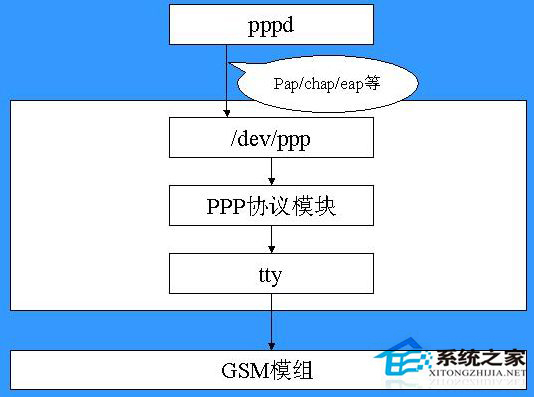
pppsetup 介面

功能特色

  • 純文字互動式選單 (ncurses)。
  • 自動產生 /etc/ppp/options、peers/provider、chap-secrets、pap-secrets。
  • 支援 PAP/CHAP 認證、動態/靜態 IP、預設路由注入。
  • 僅限 Slackware 及衍生版 (如 Salix、VectorLinux) 預載。

使用方式


sudo pppsetup
# 依提示輸入:
# 1. 裝置 (ttyS0, ttyUSB0 等)
# 2. 撥號號碼 / ISP 存取點
# 3. 使用者名稱 / 密碼
# 4. 認證協定 (PAP/CHAP)
# 5. DNS 伺服器 (自動/手動)
# 6. 是否設為預設路由

適用場景

  • 傳統撥號/ADSL/3G-USB 撥號上網。
  • 嵌入式裝置透過序列埠 PPP 連線。
  • 不想手動研究 pppd 選項的新手。

現代系統多改用 NetworkManager、ModemManager 圖形/CLI 管理寬帶連線,pppsetup 成為 Slackware 獨特的歷史印記。

Copyright © Windows教程網 All Rights Reserved