Windows 7 雖推出多年、相容性持續改善,但部分「古老」軟體仍無法直接運行。可透過 Win7 內建的「相容模式」模擬 XP 環境執行。
操作步驟
- 右鍵點選目標程式 (或捷徑) → 選擇「疑難排解相容性」。
- 選擇「找不到我的問題」。
- 出現「以前使用的 Windows 版本?」→ 選擇 Windows XP (Service Pack 3) (或更早的 Windows 98/95)。
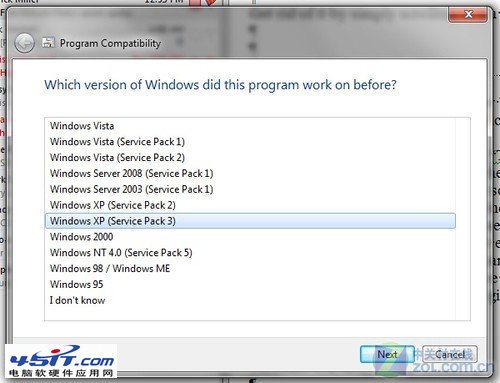
- 點選「找不到我的問題」或「最佳相容性設定」,Windows 7 將啟動模擬舊版環境運行程式。
- 返回系統點選「開始」測試程式是否可運行 → 「下一步」。
- 若設定生效,點「確定」儲存設定;失效則回步驟 3 選擇其他版本嘗試。