Windows 8 預覽版推出後,許多用戶習慣傳統的開始選單,對全新的 Metro 介面感到不適應。雖然早期已有修改註冊表的方法來啟用舊版開始選單,但操作繁瑣且風險較高。現在,一款名為 MetroController 的小工具應運而生,讓使用者無需動到註冊表,即可一鍵切換 Metro 介面的開啟與關閉。
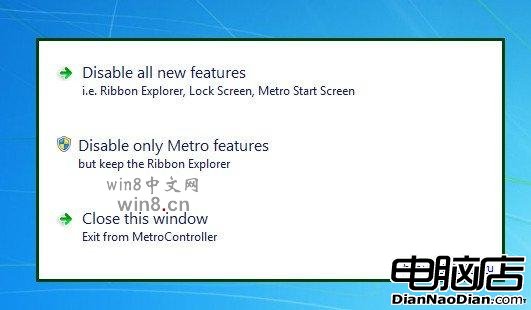
解壓縮後直接執行 MetroController.exe,主視窗呈現三個選項:
注意:壓縮包內有一個亂碼的 CMD 檔案,解壓時可能提示語法錯誤,該檔案僅用於以俄文介面啟動軟體,無法解壓也不影響正常使用。
若日後想體驗 Metro 設計,再次執行程式選擇選項三即可還原。這款工具純粹、輕量,為不習慣新介面的用戶提供了完美的過渡方案。
Windows 10 預覽版 / WP10 預覽版下載:1 月 21 日發布會後不久推送
One Windows 統一開發平台願景:Terry Myerson 詳解跨裝置生態佈局
Win10 Build 9901 原生支援 FLAC 無損音訊與 MKV 格式
啟動時間提速揭秘 Windows 8 名字起源:8 秒開機是命名靈感?
Steam 6 月統計:Windows 8 使用率 13.02% 增長放緩 64 位元版逼近 32 位元 Win 7
華擎玩家至尊 H97 效能版 749 元:超合金用料、8 相供電、硬盤管家創新功能
Windows 10 Build 10051 全新郵件應用變化詳解
傳 Intel 下一代 Kaby Lake 處理器僅支援 Win10:Skylake 已限 Win10,Apollo Lake 入門級亦同,衝擊工業 PC 領域