Windows XP Windows 7 Windows 2003 Windows Vista Windows 綜合教學 Linux 系統教學
Windows 10 Windows 8 Windows 2008 Windows NT Windows Server 電腦軟體教學
您现在的位置: Windows教程網 >> Windows教程 >  >> Windows 綜合教學 >> Windows 資訊

正版 Win7 系統備份還原功能深度解析:崩潰也能秒速恢復,免重裝煩惱

編輯:Windows 資訊

系統崩潰最讓人頭痛:重裝系統、裝驅動、裝常用軟體,耗時耗力。正版 Win7 系統穩定性極高,即便不幸崩潰,內建 備份還原 功能讓您秒速恢復:

備份操作四步驟

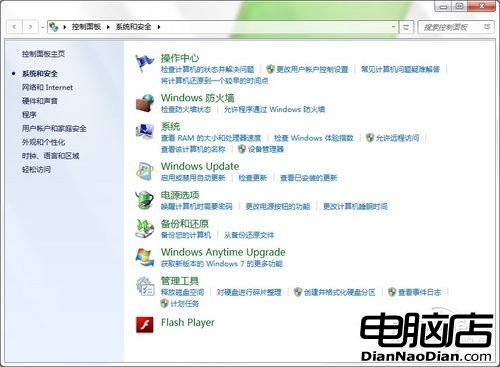
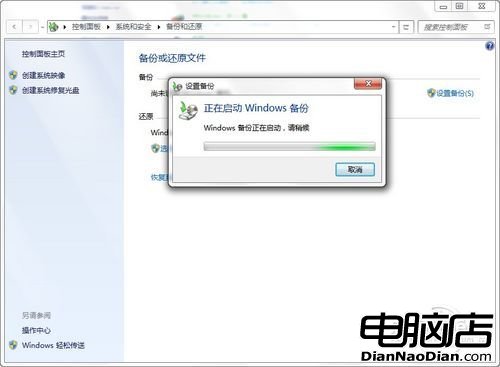
  1. 控制台 → 「備份與還原」 → 「設定備份」啟動精靈
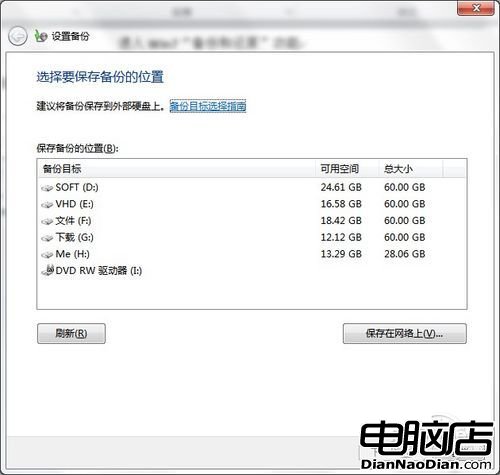
  2. 選擇備份儲存位置:非系統盤本地磁碟、移動硬碟、光碟、FTP 伺服器均可 (需足夠空間)
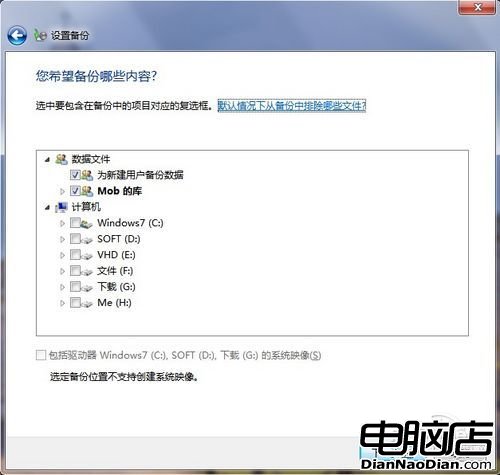
  3. 選擇備份內容:程式庫、Windows 資料夾、使用者資料等重要檔案
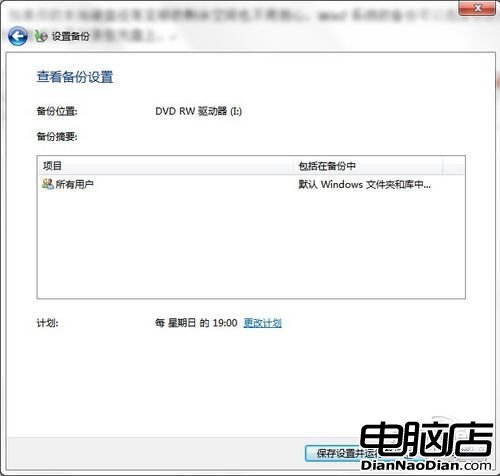
  4. 儲存設定並執行備份,完成即擁有隨時可還原的系統快照

進入備份與還原

啟動備份精靈

選擇備份儲存位置

選擇備份內容

執行備份

總結:正版 Win7 強大備份還原功能,系統崩潰也能便捷還原至備份狀態。不死機、不怕崩、免重裝——用戶最基本、最實在的需求。

Copyright © Windows教程網 All Rights Reserved