Windows 7 執行 Windows Update 時出現錯誤代碼 8024402F(「未知錯誤」),常見成因包括網路擁塞、第三方安全軟體阻擋、Cryptographic Services 服務異常、系統檔案損毀。本文提供分級解決方案。
SFC /SCANNOW 並等待完成。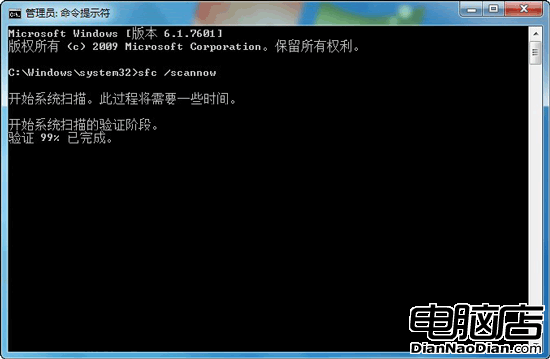
以系統管理員身分依序執行:
REGSVR32 C:\Windows\System32\CRYPTDLG.DLL
REGSVR32 C:\Windows\System32\DSSENH.DLL
REGSVR32 C:\Windows\System32\GPKCSP.DLL
REGSVR32 C:\Windows\System32\INITPKI.DLL
REGSVR32 C:\Windows\System32\MSSIP32.DLL
REGSVR32 C:\Windows\System32\RSAENH.DLL
REGSVR32 C:\Windows\System32\SCCBASE.DLL
REGSVR32 C:\Windows\System32\SLBCSP.DLL
REGSVR32 C:\Windows\System32\SOFTPUB.DLL
REGSVR32 C:\Windows\System32\WINTRUST.DLL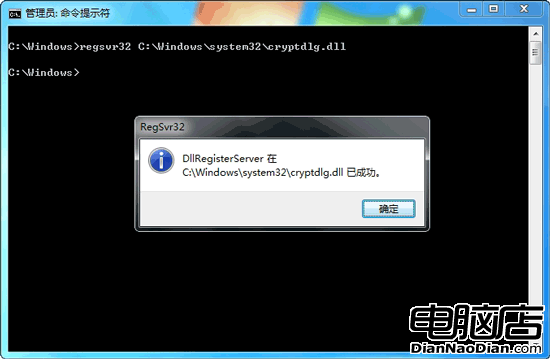
或存為 Register_Crypto_DLLs.bat 批次執行(內容見原文)。完成後重開機,再次嘗試 Windows Update。
錯誤 8024402F 常因 Cryptographic Services 服務依賴的 DLL 註冊遺失或損毀,導致更新簽章驗證失敗。重新註冊上述核心加密 DLL 可恢復服務功能。