Windows XP Windows 7 Windows 2003 Windows Vista Windows 綜合教學 Linux 系統教學
Windows 10 Windows 8 Windows 2008 Windows NT Windows Server 電腦軟體教學
您现在的位置: Windows教程網 >> Windows教程 >  >> Windows 綜合教學 >> Windows 資訊

找回 Win 7 桌面消失的 IE 圖示:五種方法任你挑

編輯:Windows 資訊

Win 7 安裝後桌面預設無 IE 圖示,五招找回:

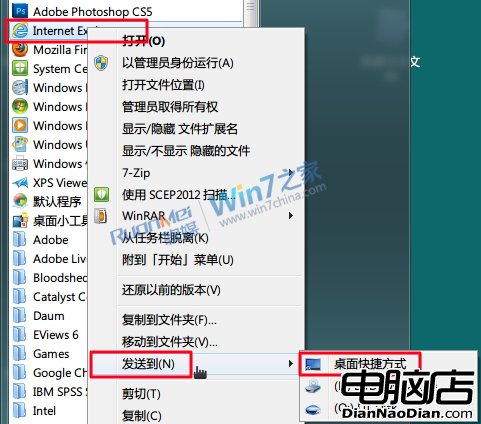
  1. 開始選單送到桌面:開始 → Internet Explorer 右鍵 → 送到 → 桌面捷徑。缺點:右鍵無 IE 專屬選項(如無增益集啟動)。
  2. 程式資料夾建立捷徑:C:\Program Files\Internet Explorer\iexplore.exe 右鍵 → 送到桌面。缺點同上。
  3. 電腦導覽窗格拖曳:開啟電腦 → 左側收藏夾點選「桌面」 → 發現 IE 圖示 → 右鍵建立捷徑或拖曳。優點:右鍵含 IE 專屬選項。缺點:無法拖曳釘選至工作列。
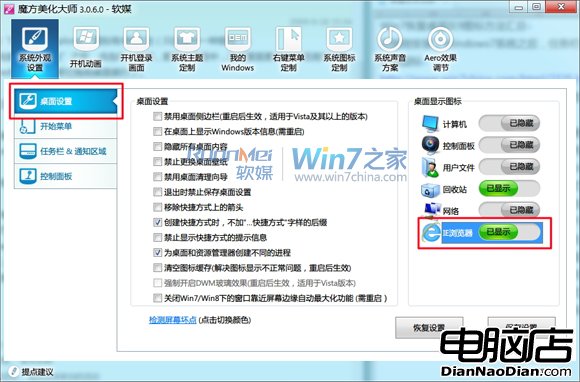
  4. 魔方優化大師一鍵顯示:美化大師 → 系統外觀 → 桌面設定 → IE 瀏覽器設為「已顯示」。優點:非捷徑、右鍵精簡含專屬選項。
  5. 登錄編輯器修改鍵值:Win+R → regedit → 定位 HKEY_CURRENT_USER\Software\Microsoft\Windows\CurrentVersion\Explorer\HideDesktopIcons\NewStartPanel → 將 {B416D21B-3B22-B6D4-BBD3-BBD452DB3D5B} DWORD 值改為 0 → 重新整理桌面或重啟 explorer.exe。效果同方法四。

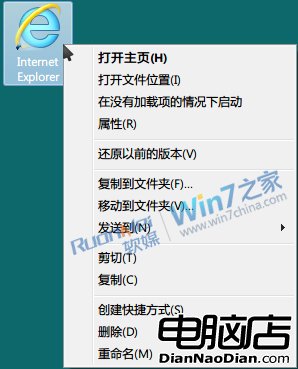
依習慣選擇最順手的方法,讓 IE 圖示重回桌面。

Copyright © Windows教程網 All Rights Reserved