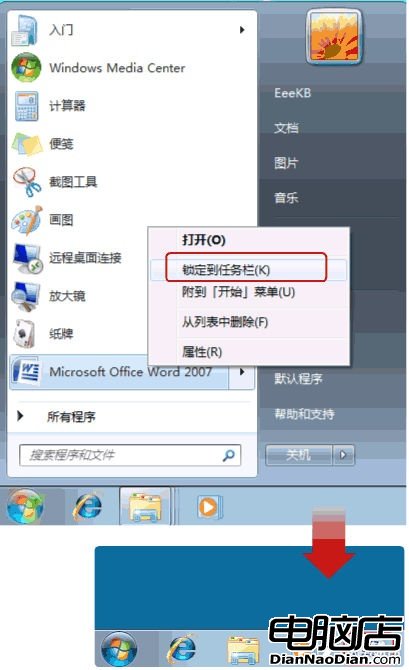
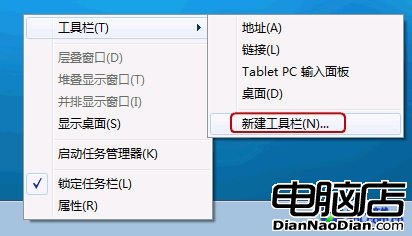
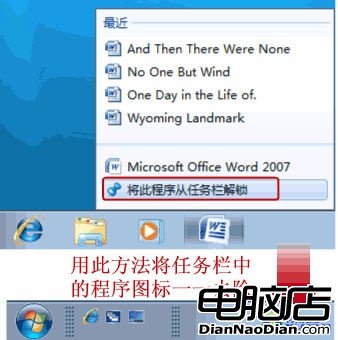
Win7 取消了 XP 的「快速啟動列」,但功能仍在:滑鼠右鍵程式選「鎖定至工作列」即可。若想找回 XP 風格,可自建工具列:
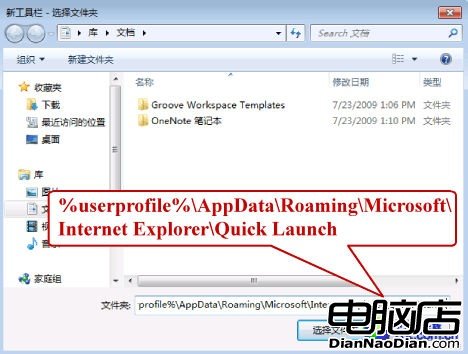
%userprofile%\AppData\Roaming\Microsoft\Internet Explorer\Quick Launch
將程式鎖定至工作列
新增工具列
在資料夾輸入路徑
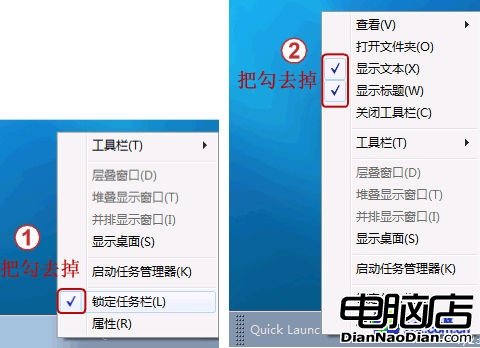
取消鎖定工作列
解除工作列中已有程式
50 個 Windows 8 操作技巧大全:從鎖屏到修復系統的完整指南
WP 兼容 Android 應用?微軟不做,第三方來嘗試
WP8.1 Cortana 反饋功能上線:直接向微軟提交建議,中文版即將發布
企業部署 Win 8 Metro 應用新選項:繞過商店認證、IT 管控靈活
Win10 斯巴達瀏覽器「實驗版」標題列效果更優,UI 持續打磨
Windows 10 Build 10074 推送雙安全更新修補漏洞
Google 推出 Consumer Surveys 付費線上問卷服務:每份回覆 0.1 美元、即時統計報表
Win10 已支援 SLI/Crossfire 多顯示卡技術,正修復垂直同步問題