Windows Vista 用戶可能發現,XP 時代「網路鄰居」中「在系統托盤顯示網路圖示」選項不見了。其實微軟只是將其移至更方便設定的地方。
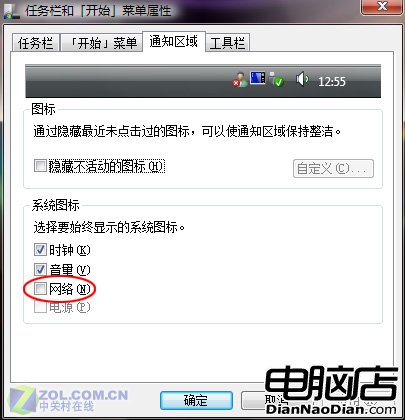
登入 Vista,任務列右鍵選「屬性」→ 切換「通知區域」標籤 → 對話框下方「網路」選項前打勾即可。
圖1:在網路核取方塊前打勾
小提示: 切換至「工具列」標籤,還可設定是否在工具列顯示「桌面」、「Windows Media Player」等,方便操作。
Windows 8.1 用戶優先體驗必應全新搜尋結果頁面
Windows 7安全模式九大實戰技巧:從頑固文件清理到惡意啟動項排查
網絡人遠程桌面連接:掀起遠程教育新革命
Windows 10 技術預覽版亮相:開始菜單回歸、虛擬桌面與命令提示符增強
Win7 板凳哥升職記 11:助人是把妹之道!
微軟下周一舊金山召開發布會 傳將發表重大產品
WP8.1 操作中心新截圖曝光:快速切換與通知列表整合、一鍵清除所有通知
路由器設定正確卻無法上網?修改 LAN IP 地址段解決雙路由衝突