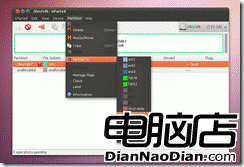
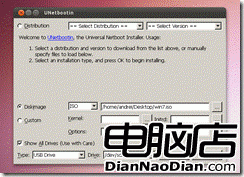
無 Windows 環境時,在 Linux 製作 Win7 USB 安裝碟步驟:
sudo apt-get install gparted ntfs-3g
圖示展示 GParted 格式化與 UNetbootin 介面操作。
Windows 8 重裝後如何重新啟用正版授權:保留安裝程式是關鍵
微軟修復最後一項 Bug 後將釋出新版 Win10
微軟確認正在開發 WP 版遠端桌面應用,但無時間表
Windows 10 太強勢:Win8/Win8.1 市場份額下降
Windows 8 重現 Windows 1.0 歷史軌跡:27 年輪迴驚人相似
消費者報告:多數用戶堅持 Win 7/XP,Win 8 專業版也難撼動,缺觸控生態、習慣難改、驅動不全
5 月 13 日補丁日將至 微軟堅持切斷未升級 Win 8.1 Update 用戶補丁
Ubuntu 創辦人宣戰:企業 Linux 不只有 Red Hat,W3Techs 數據顯示 Ubuntu 超越 RHEL