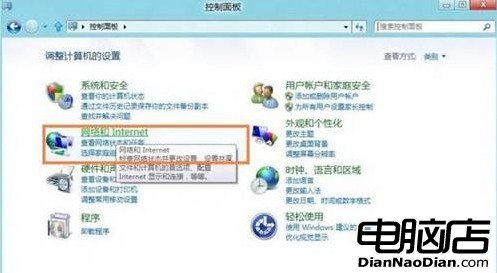
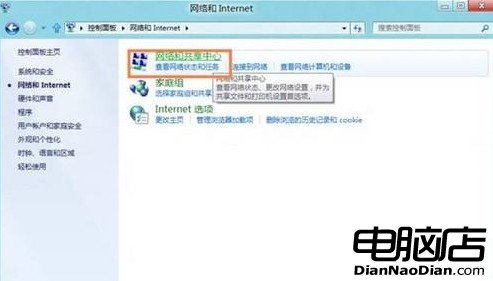
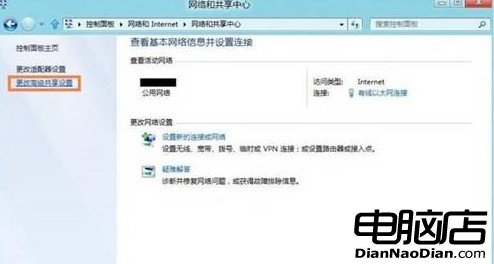
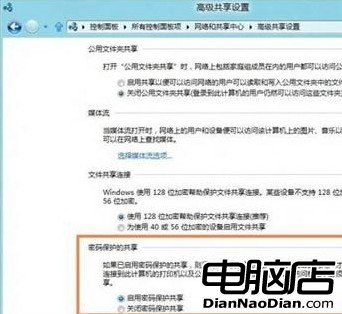
Win8 強化區域網路共享密碼保護功能,設定僅需 4 步驟:
功能比 Win7 更強大,有效提升共用檔案安全性。
Windows 8.1 Build 9477 發放合作夥伴 進入 RTM Escrow 階段
網友構想 Windows 9 開始畫面:時間、天氣、新聞、音樂一覽無遺
IT之家 Win8 版 v1.11 上架:介面改進、修復崩潰 Bug
華碩英特爾版Windows 8平板VivoTab Smart悄然上市:Atom Z2760、10.5小時續航
FSF 批評 Windows 8 UEFI 安全啟動實為「受限啟動」:林納斯·托瓦茲質疑其真實安全效力
Win10「主頁」好用嗎?深度調教讓它完美替代「這台電腦」
鮑爾默該下台嗎?BBC 深度剖析:業績飛紅但錯失移動良機、繼任者未知數
QQ HD 1.3 正式發布:專為 Android 平板打造的全新體驗