若你已安裝新版 Windows 10 技術預覽版 Build,並切換至美區以英文啟用,即可體驗 Cortana。Cortana 是微軟日漸熱門的個人數位助理,此前僅限手機用戶,現已普及至 Windows。
「Hey Cortana」功能亦已提供給 Windows 10。在 Lumia 930 和 Lumia 1520 安裝 Lumia Denim 更新後,可透過語音指令「Hey Cortana」喚醒數位助理。功能預設停用,以下教學如何啟用。
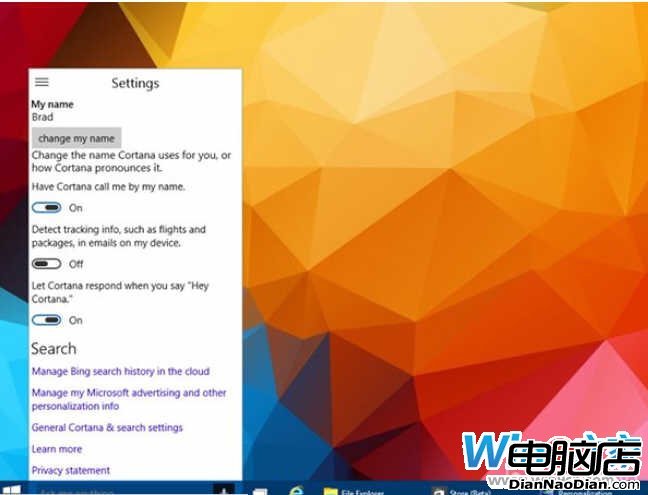
啟用 Hey Cortana(Windows 10 預覽版)
有趣的是,與手機版不同,你不需說「Hey Cortana」後等待確認再下指令,而可一次說出「Hey Cortana,今天天氣如何」,她會直接回報預測,更自然。
Cortana 鍵盤快捷鍵
若習慣鍵盤操作,記住這兩個:
都非常容易記憶且實用,相信你會常用。若尚未在 Windows 10 獲得 Cortana 功能別擔心,微軟確定會在年內更新中推出此服務。
Win10 合作夥伴大會 WPC 2015 7 月奧蘭多登場
微軟開放Windows 8.1相容性中心:查詢應用/裝置相容性、下載驅動程式
Windows 8 Build 9220 截圖曝光,版本號超越正式版 9200,疑似 Windows Blue 早期版本
微軟 5 月修補日:修復 Windows Server 3 漏洞 (含危急級)、Office 1 漏洞
Windows 8 Metro 應用程式生命週期四階段:未執行、執行中、暫停、終止
英特爾白皮書:企業部署 Windows 8 分四階段 參考 Win 7 遷移經驗
Win10 消費者預覽版曝光:系統水印顯示「Windows Technical Preview for Consumer」,功能與技術預覽版差異不大