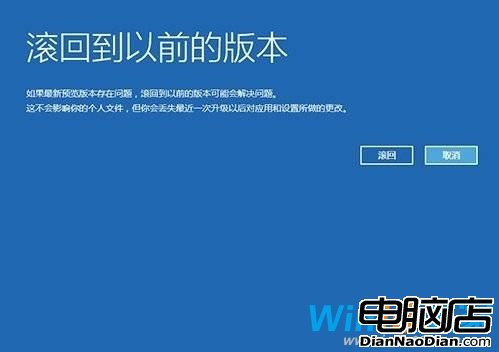
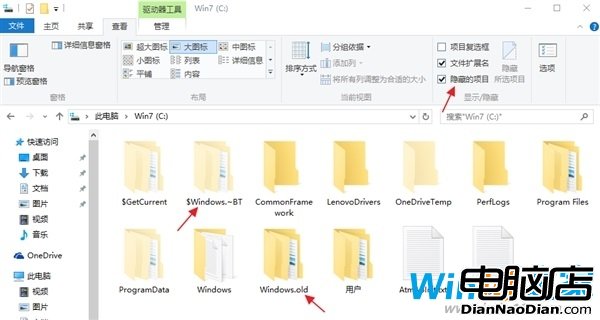
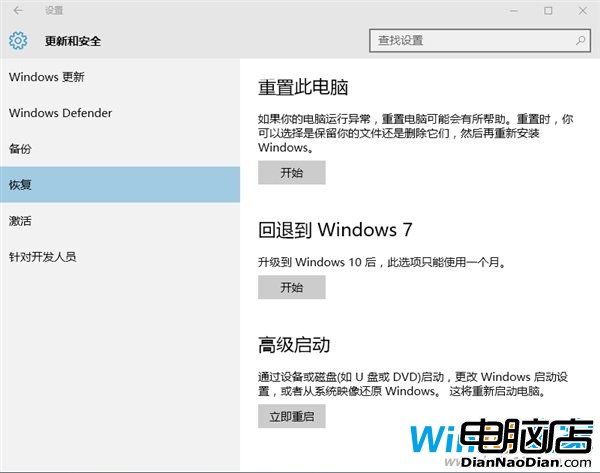
微軟提供 30 天無損降級通道 (依賴 `Windows.Old` 與 `$Windows.~BT`/`$Windows.~WS` 兩資料夾),30 天后系統自動刪除。突破方法:
隨時間推移 30 天期限將到,提前備份/重命名即可隨心降級。
善用 Windows 7 稽核原則:讓電腦自動記錄程式執行證據
WP 8 版 QQ 4.3 內測版二次更新:新增 QQ 空間上傳圖片、雙人語音通話等
洩露截圖顯示Win8.1新增設定遷移功能:舊電腦設定一鍵同步新機
Win10 再迎新累積更新 KB3081438 主要修復安全漏洞 更新頻率印證服務模式
Windows 10 通用應用(UWP)設計指南正式釋出
Win10 首個大幅 Bug 修復更新 SR1 下周推送,10 月將有功能性大更新
經典不敗:Windows XP 八大隱藏小技巧 (記事本記時、離線網頁捷徑、快速郵件、開始選單釘選、CapsLock 鳴響、回收站加密、取消任務列群組、修改檔案日期、卸載無用 DLL、預讀優化)
Windows 8.1 Build 9478 確認進入 RTM 分支 正式版呼之欲出