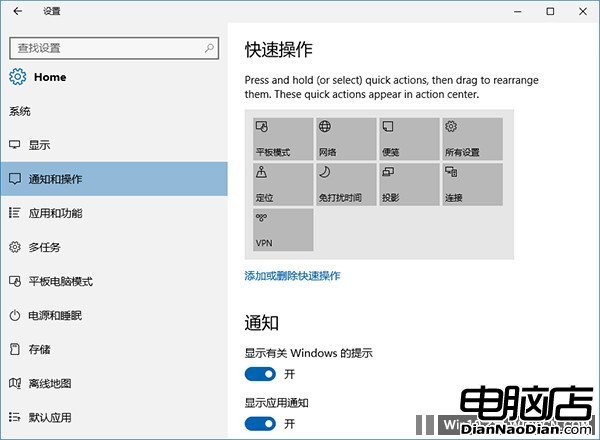
Windows 10操作中心在周年更新中新增卡片式圖文通知。在PC預覽版14328中,操作中心底部磚塊設置更科學方便,功能增刪一鍵到位。
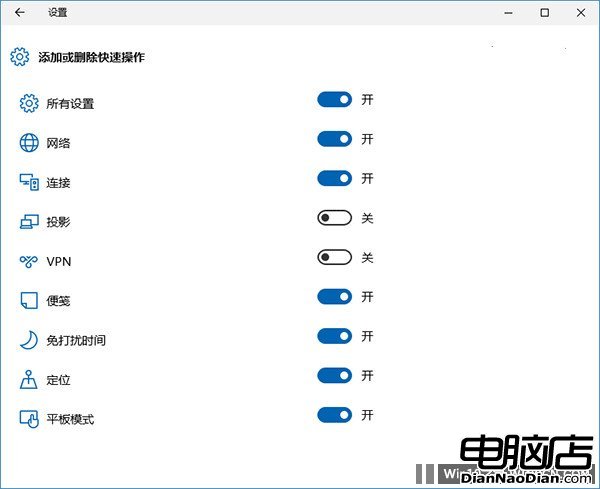
新版列出現有磚塊項目和排列,用戶可在設定→系統→通知和操作→快速操作中直接拖拽改變順序。增刷磚塊點擊「添加或刪除快速操作」設置(如下圖)。
進入後可直接通過右側開關一鍵增刪各項磚塊,界面直接給出所有磚塊列表,操作更清晰明確。微軟正優化Windows 10設置界面UI設計,使其更符合用戶習慣、更簡潔簡單。正式版中用戶將體驗更合理、美觀、易用的系統。
Win10 Redstone 新版即將釋出:版本帝瘋狂編譯模式,15 天 15 個 Build 平均三天一版
Hold 住你的世界:Windows 7 多媒體功能大公開 — Media Player 12 與 Media Center 雙引擎
微軟前員工洩露 Windows 8 核心碼 判刑 3 個月罰款 100 美元
Xbox One 客製化配色服務:整容手術費 249 美元
舊版 Windows 10 預覽版即將到期停服,請速升級
Ubuntu 10.10 Maverick Meerkat 正式發布:Unity 介面重塑上網本體驗
Win10 獲第二枚累積性更新與安全補丁推送 修復 Flash/Silverlight/Edge/IE 漏洞
善用 Windows 7 稽核原則:讓電腦自動記錄程式執行證據