電腦操作不當常導致程式被更改。本文分享 Win7 顯示隱藏檔案教學,幫助找回被隱藏的資料。
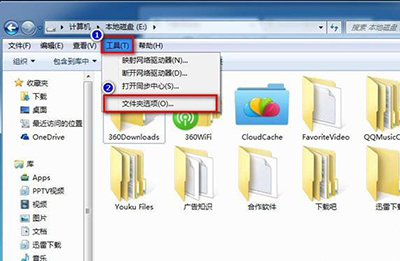
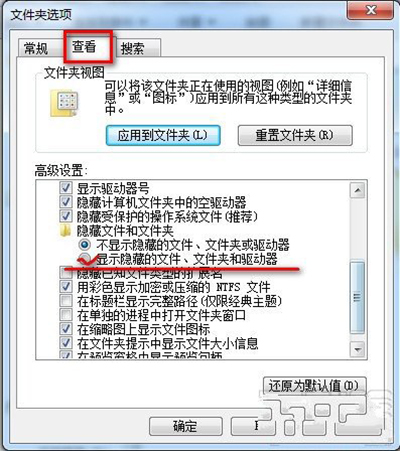
操作簡單,希望對大家有幫助。
Win10 紅石預覽版 10525 升級失敗 0x80072EFD 解決:關閉防火牆或修改 DNS
Win7 列印提示缺少 VSPRINT7.OCX?註冊元件檔案即可解決
Win8 禁止縮略圖顯示文件圖標:資料夾選項「查看」取消勾選即可
微軟重申:Win7/8.1 升 Win10 後不採年費制,首次安裝必須為升級模式才能自動繼承授權
Win10 最新預覽版 Build 10031 曝光:開始選單回歸半透明毛玻璃設計
微軟推送 Win10 Mobile 10586.107 預覽版:修復開始磚遺失、增加敘述人語言、優化 BitLocker 重置體驗