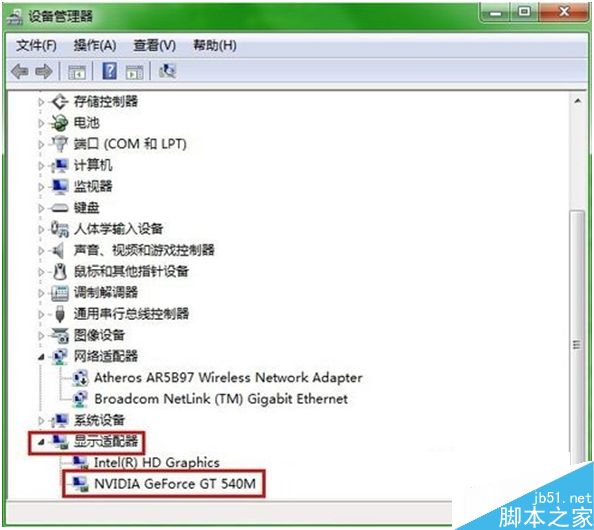
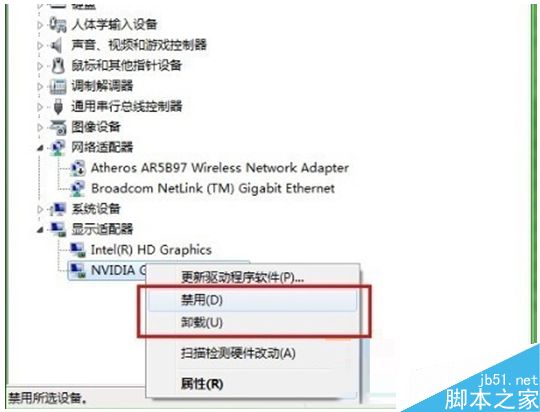
Win10 系統如何禁用獨立顯卡?獨顯驅動無法安裝導致藍屏、視頻無法播放等問題時,若使用雙顯卡筆記本,可暫時禁用獨顯。以下是具體操作步驟:
禁用獨顯後仍可使用集顯,雖性能降低但能滿足日常使用。
以上就是 Win10 禁用獨立顯卡的方法,希望幫助到大家,更多內容請關注本站!
Win10 0xAB 蓝屏修复补丁 KB3019269 已推送:Build 9879 用户通过 Windows Update 安装即可解决
Win7 如何加快任務列預覽視窗速度?修改註冊表即可
Windows 10 RedStone 重大更新更多細節曝光 明年推出非功能大躍進
Win7 禁止開機啟動項與軟體自動運行:msconfig 精簡啟動項、大勢至 USB 管理軟體強力阻擋流氓軟體
Win8.1 開啟「遠端登錄服務」完整設定教學(含 Telnet 用戶端安裝)
Win7 修改開機/關機音樂圖文教程:自定義 WAV 聲音輕鬆換
Win10 10159 無法升級?5 大解法:驗證帳號、修復我、切快速通道、重啟更新服務、改用 ISO 升級
Win10 Build 10061 鎖畫面黑屏解決:微軟釋出 KB3055415 修補程式與臨時繞過法