Windows XP Windows 7 Windows 2003 Windows Vista Windows 綜合教學 Linux 系統教學
Windows 10 Windows 8 Windows 2008 Windows NT Windows Server 電腦軟體教學
您现在的位置: Windows教程網 >> Windows教程 >  >> Windows 綜合教學 >> 關於 Windows

Win10 14328 開始選單「所有應用」空白?PowerShell 重註冊 + 重啟 Explorer 修復

編輯:關於 Windows

問題現象

Win10 一週年更新 14328 點擊開始選單「所有應用」顯示空白,此為已知 Bug,官方尚未修復。

有效修復組合拳

  1. 以管理員身分開啟 PowerShell,執行重註冊指令:
    Get-AppxPackage -AllUsers | Foreach {Add-AppxPackage -DisableDevelopmentMode -Register "$($_.InstallLocation)\AppXManifest.xml"}
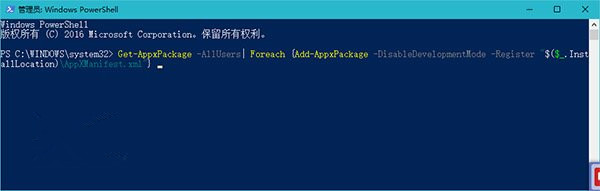

  2. 指令跑完後,右鍵工作列 → 工作管理員 → 程序 → Windows 探索器 → 右鍵「重新啟動」。
  3. 開始選單「所有應用」即恢復正常顯示。

PowerShell 重註冊 AppxPackage

工作管理員重啟 Explorer

原理

PowerShell 指令重新註冊所有 UWP 應用套件資訊清單,修復應用資料庫;重啟 Explorer 重新載入開始選單 UI,雙管齊下解決空白問題。

Copyright © Windows教程網 All Rights Reserved