Windows XP Windows 7 Windows 2003 Windows Vista Windows 綜合教學 Linux 系統教學
Windows 10 Windows 8 Windows 2008 Windows NT Windows Server 電腦軟體教學
您现在的位置: Windows教程網 >> Windows教程 >  >> Windows 綜合教學 >> 關於 Windows

Win10 右鍵選單新增 PowerShell 腳本建立項,一鍵建立 .ps1 檔案

編輯:關於 Windows

一般建立 PowerShell 腳本(.ps1)需透過 PowerShell ISE 或記事本修改副檔名,步驟稍嫌繁瑣。其實只要在登錄檔新增一個值,即可在右鍵「新增」選單中直接建立 PowerShell 腳本檔案,操作更直觀高效。

操作步驟

  1. 在 Cortana 搜尋列輸入 regedit,按 Enter 開啟登錄檔編輯器。
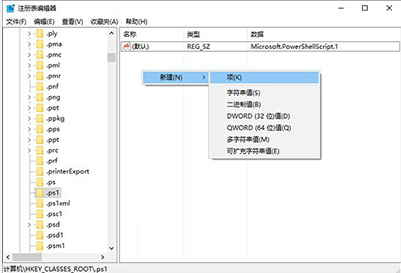
  2. 定位至路徑:HKEY_CLASSES_ROOT\.ps1
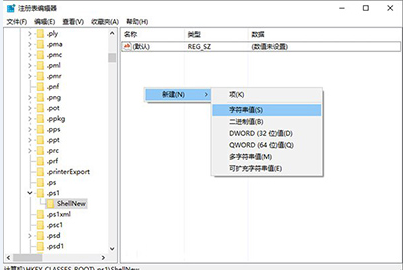
  3. 在該項目下建立新項目(Key),命名為 ShellNew。

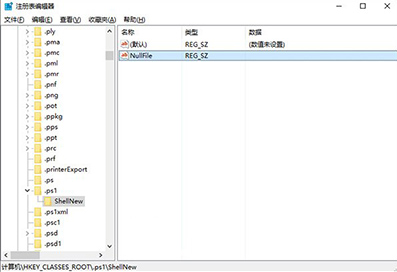
  4. 在 ShellNew 下建立新的「字串值」,名稱為 NullFile,數值資料留空(代表建立空白檔案)。

完成後,在資料夾或桌面右鍵選單的「新增」中,即會出現「PowerShell 腳本」選項,點擊即可直接建立 .ps1 檔案,無需再手動更改副檔名。

注:原文包含軟體下載資訊與分頁導航,此處僅保留核心技術教學內容。

Copyright © Windows教程網 All Rights Reserved