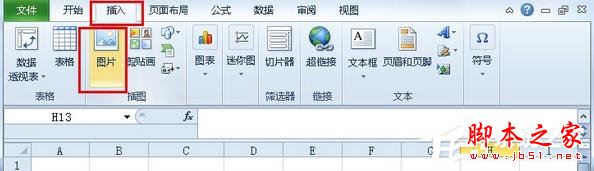
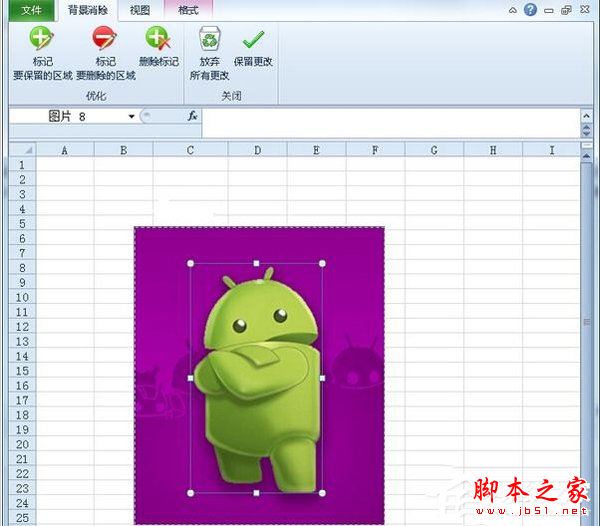
Office 2010 引入「移除背景」功能,Win10 下同樣適用。無需 Photoshop,Excel 即可快速抠圖:插入圖片 → 格式 → 移除背景 → 標記保留區域 → 保留變更。
此功能同樣存在於 Word、PowerPoint 2010 以上版本,適合簡單抠圖需求,免安裝額外軟體。
Windows 10 TH2 整合 Skype 預覽版:取代 Win8 獨立 App,訊息/視訊/電話三合一體驗
Win7 補丁 KB3110329 安裝卡在 12% 報錯 800705B4?微軟尚未提供官方修復,少數用戶受影響
Win10 一秒建立桌面捷徑:開始選單直接拖曳應用到桌面
進程管理器中 chrome.exe *32 是什麼意思?代表 32 位元程序非 32 個進程
Win8 切換 Microsoft 帳戶失敗錯誤 0xd00000bb?新增本地帳戶再切換繞過驗證
[圖] 騰訊 Win10 升級助手介面曝光:僅含預約提示、QQ 等級加速誘因、永久免費標語
Win7 更換桌面背景三大法:預設主題、自訂圖片、幻燈片輪播
Win7 查看與評估 Windows 體驗指數 (WEI) 教學:系統屬性→效能評分完整流程