Windows XP Windows 7 Windows 2003 Windows Vista Windows 綜合教學 Linux 系統教學
Windows 10 Windows 8 Windows 2008 Windows NT Windows Server 電腦軟體教學

Win8 應用商店無法開啟/連線失敗:netsh winhttp 導入 IE Proxy 修復法

編輯:Win8 系統應用技巧

Win8 應用商店若提示「無法連線網路」或長轉圈無法載入,常因 WinHTTP Proxy 設定異常(未正確繼承 IE/系統 Proxy)。透過 netsh winhttp import proxy source=ie 可快速修復。

修復步驟

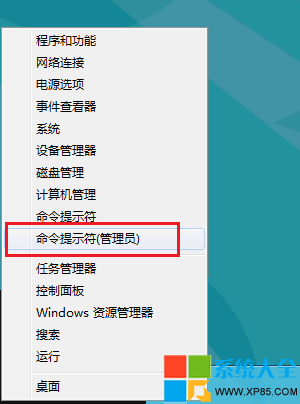
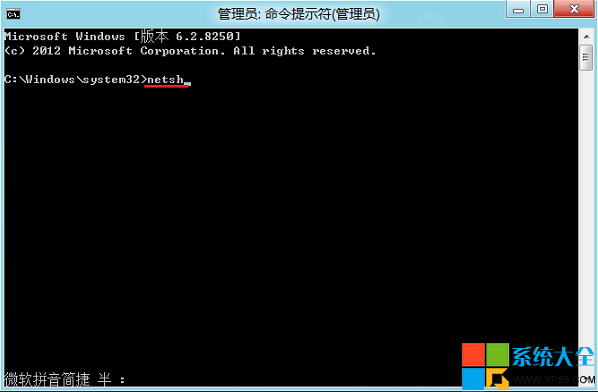
  1. 開始畫面輸入 cmd,右鍵命令提示字元 → 以系統管理員身分執行。
  2. 依序輸入以下指令,每行按 Enter:
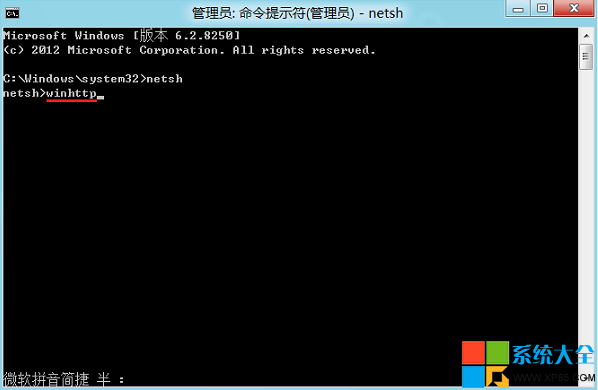
netsh
winhttp
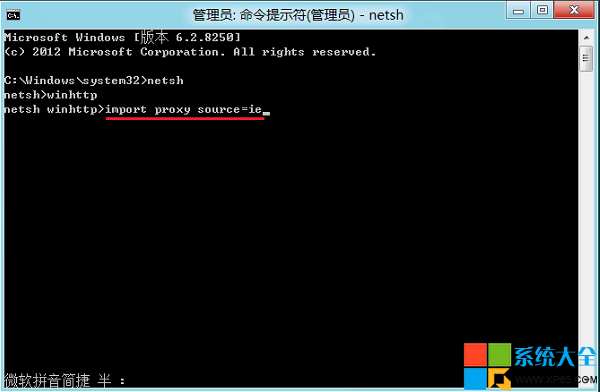
import proxy source=ie
exit
  1. 關閉視窗,重新開機。
  2. 再次開啟應用商店測試連線。
管理員命令提示字元 netsh 介面 winhttp 內容 import proxy 指令

原理解析

  • Win8 應用商店(Modern Apps)使用 WinHTTP 進行網路存取,而非 WinINET(IE/傳統應用使用)。
  • 若系統設定了 Proxy(公司/學校/VPN),IE 可正常上網,但 WinHTTP 若未同步 Proxy 設定,Modern Apps 就會連線失敗。
  • import proxy source=ie 將 IE 的 Proxy 設定(含自動設定腳本 PAC)複製到 WinHTTP,解決不一致問題。

補充:若無 Proxy 環境,執行後 WinHTTP 會顯示「Direct access (no proxy server)」,同樣正常。若問題持續,嘗試 wsreset.exe 重設商店快取,或檢查防火牆/防毒軟體是否攔截商店進程。

Copyright © Windows教程網 All Rights Reserved