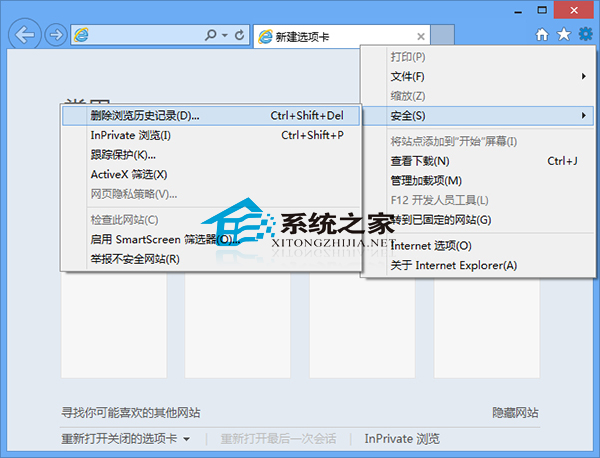
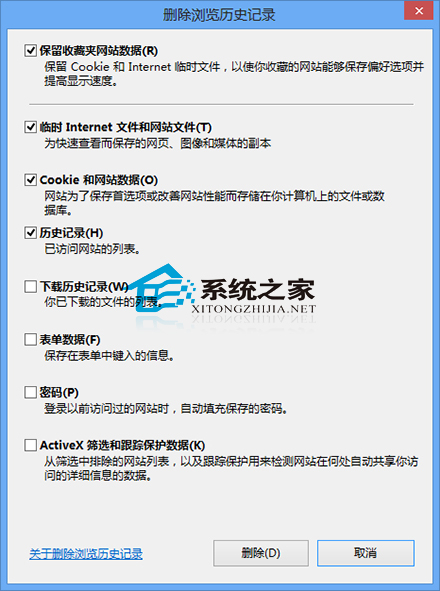
公用電腦或定期清理隱私時,IE 提供完整的瀏覽歷史清除功能,可選擇性保留密碼、表單資料等。
亦可使用 CCleaner 等第三方工具進行更深度清理(登錄、快取、臨時檔案等)。
Windows 8 開啟「開啟或關閉 Windows 功能」顯示空白解決:SFC 掃描與註冊 DLL
Windows 8 設定使用者帳戶密碼完整圖文教學
Win8 IE10 關閉「關閉多個頁籤時發出警告」提示框
Win8.1 免密碼自動登入設定:Netplwiz 一鍵搞定
Win8 虛擬記憶體設定擴大儲存空間:解決大型遊戲記憶體不足卡頓
Win8 取得資料夾最高權限刪除頑固檔案:安全性分頁編輯與右鍵選單註冊表法
Win8 統一修改資料夾檢視模式:開啟目標模式資料夾 → 檢視 → 選項 → 套用至所有資料夾
Win8 取消開機動畫加快啟動速度:效能選項關閉動畫特效