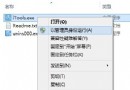
桌面或檔案總管右鍵選單無反應、項目缺失、或整個選單不彈出。
HKEY_CLASSES_ROOT\Directory\Background\shellex\ContextMenuHandlers
fix_right_click.reg
explorer.exe
此修復針對 Shell 擴充功能登錄項目損毀/遺失,適用於多種右鍵選單異常情況。
Win8 從電腦設定進入傳統控制台:Modern 介面的橋樑
Windows 8 常用軟體在 Windows 8.1 上能跑嗎?實測 30+ 款熱門應用相容性報告
Win8 調整左右聲道平衡教學:雙語影片單聲道收聽技巧
Win8 IE 瀏覽器查看下載項:Ctrl+J 快捷鍵或選單操作
維護 Windows 網路伺服器安全八大核心策略
Win8 快捷鍵大全:常規操作、IE10、檔案總管三大分類完整收錄
Windows 8 解決 Administrator 帳戶無法登入:帳戶已停用啟用教學
Windows 8 桌面版 IE10 無法開啟 QQ 空間解決法:F12 開發人員工具切換瀏覽器模式為 IE9