Windows 8 移除的是開始按鈕,開始選單資料夾(%ProgramData%\Microsoft\Windows\Start Menu)仍存在。透過建立工作列工具列即可還原類似體驗。
%ProgramData%\Microsoft\Windows\Start Menu → 選取資料夾。
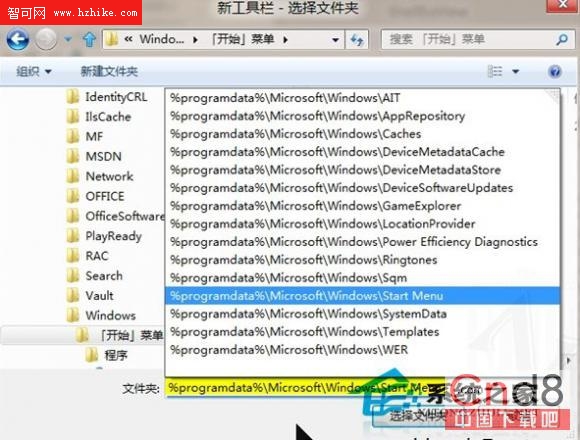
工具列建立後,可在該資料夾手動加入捷徑:計算機、控制台、系統屬性等常用項目。並可再建立一個「桌面」工具列,以浮動視窗快速存取桌面圖示。
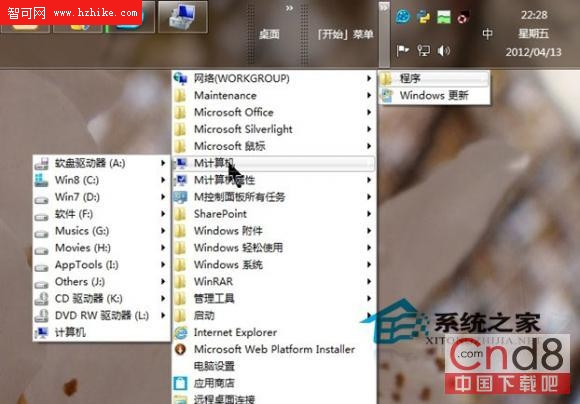
此法無需第三方軟體,純原生操作,完美還原開始選單核心功能,適合懷舊或特殊需求用戶。
Windows 8 體驗連載 (三) 全新工作管理器 (中):程序分組與資源預警、線上查詢、啟動項管理
Win 8 預覽版一日體驗:輸入法、快速切換、IE10、軟體相容性測試
Win10/Win8.1/Win7 滑鼠單鍵切換同程式多視窗:修改登錄啟用 LastActiveClick
最新 Windows 8 系統截圖賞析(五):Windows 功能開關、IE9 瀏覽器、Beta 版標識、說明與支援
Windows 8 遊戲無法全螢幕?三大解決方案:設定檢查、登錄修改、驅動更新
Windows 8.1 2014 Update 全景體驗:傳統桌面與 Modern 應用深度融合,視窗化回歸成最大贏家
Windows 8.1 Preview 常見問題完整彙整:系統需求、安裝方式、保留檔案、相容性、解除安裝、產品金鑰、企業版資源