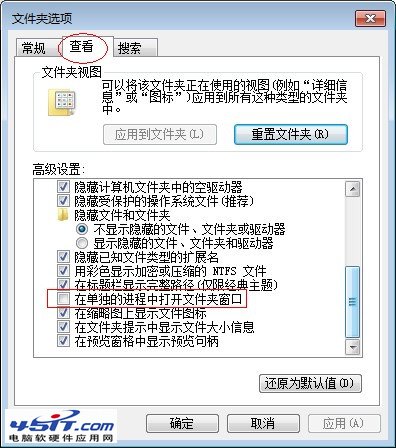
安裝 Win7 64 位元系統後,開啟檔案總管(資源管理器)卻彈出錯誤視窗:「explorer.exe 伺服器執行失敗」。這並非系統損壞,而是資料夾選項設定問題,關閉「在獨立程序中開啟資料夾視窗」即可解決。
此設定預設開啟會導致某些環境下 explorer.exe 崩潰,關閉後即可恢復正常操作。
Win7 如何啟用語音辨識功能?麥克風設定與訓練完整流程
Windows 7 巧設解決 IPv6 訪問難題(一):故障現象與初步排查
關閉 Windows 7 內建搜索功能:透過「開啟或關閉 Windows 功能」停用 Windows Search
Win7 內建 DirectX 版本為何顯示 10.0?取決於顯卡硬體支援
Windows 7 音量調節綠色動畫條消失?開啟「視窗內動畫控制項和元素」找回
Windows 7 磁碟分區新觀念:單一分區配合程式庫功能最輕鬆
Windows 7 清理通知區域圖示殘留項目:登錄法與 REG 檔一鍵淨化
將 Windows 7 winsxs 資料夾移至非系統碟釋放空間完整教學