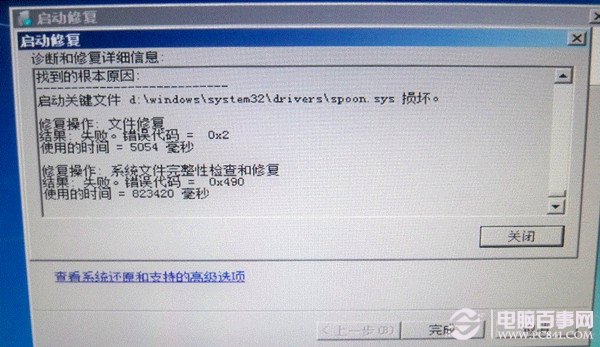
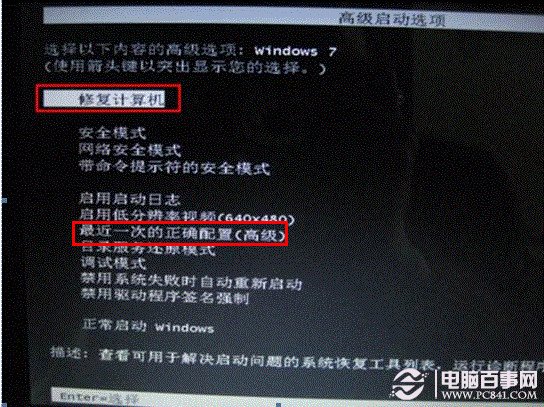
開機卡住、藍屏提示 d:\Windows\system32\drivers\spoon.sys 錯誤?此檔常因安全軟體殘留導致。兩種修復法任選一:
d:\Windows\system32\drivers\spoon.sys
C:\Windows\system32\drivers\spoon.sys
del C:\Windows\system32\drivers\spoon.sys
刪掉 spoon.sys,Win7 開機順暢復活!
Windows 7 移除捷徑小箭頭三大法:註冊表修改法最徹底避免副作用
Win7 視窗跑到螢幕右側邊外拉不回來?關閉多顯示器擴展模式即時修復
Windows 7 旗艦版關閉 Aero Shake 搖晃最小化功能:群組原則一鍵禁用
微軟高管專訪:使用盜版 Windows 7 的後果與反盜版策略
Win7 系統修復功能實用性分析:啟動修復、系統還原、記憶體診斷
Windows 7 善用憑證管理器提高存取速度
Windows 7 省電不斷網:啟用 Away Mode 讓下載、工作持續運行同時降低功耗
10 分鐘搞定 Win7 版本升級:Windows Anytime Upgrade + 升級金鑰,免重灌、免光碟、資料設定全保留