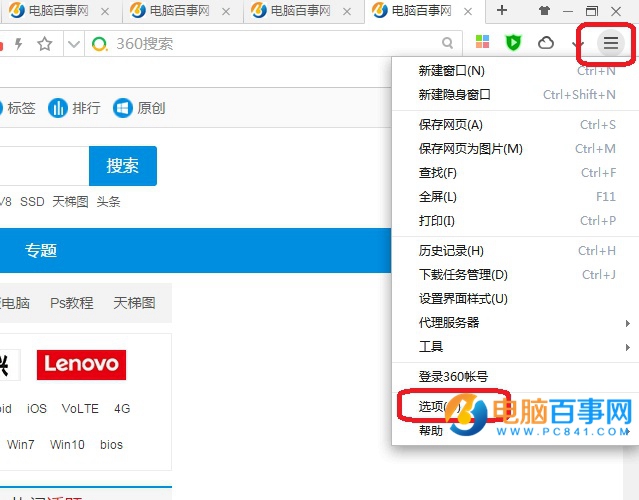
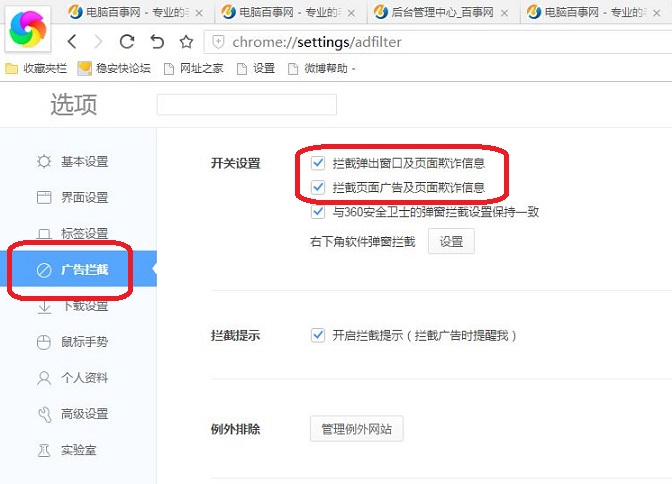
360 瀏覽器內建廣告攔截模組,無需安裝擴充功能,兩步即可開啟攔截彈出視窗與頁面廣告,淨化瀏覽體驗。
開啟後重新整理網頁,廣告即被過濾。若遇誤攔截正常內容,可在該頁面右鍵選單將網站加入白名單。
ADSL 雙網卡共享上網設定指南:拒用 ICS、改用 Sygate、雙網卡 IP 規劃與代理設定
放棄 XP 拥抱 Windows 7 的七大鐵證:穩定、兼容、低門檻、快速、易用、安全、與時俱進
10 招 Windows 7 進階優化技巧:磁碟整理加速、IE 附加元件診斷、系統還原微調、神祕指令與隱藏功能
電腦硬碟隱私檔案加密與隱藏技巧(三):TrueCrypt 雙重加密防駭客
Windows 7 系統優化:將 winsxs 資料夾移至非系統盤透過符號連結釋放 C 槽空間加速系統
Win7 命令提示字元 DOS 指令失效「非內部或外部指令」?環境變數 Path 被竄改,補回系統路徑即可
Windows 7 工作排程器:彈性自動化執行程式完整教學
Win7 為特定帳戶開啟免密碼「綠色通道」自動登入