使用藍牙連接手機後,「裝置和印表機」中殘留灰色的「Bluetooth 裝置」圖示,右鍵刪除無反應。此為驅動程式無法正確識別裝置韌體所致,需透過藍牙設定視窗正確移除配對。
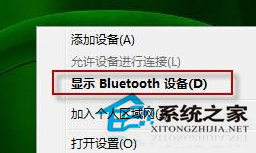
若仍無法移除,可嘗試在「裝置管理員」中解除安裝該藍牙裝置驅動程式,重開機讓系統自動重裝驅動。
Win7 WmiPrvSE.exe 是什麼進程?WMI 提供者主機功能解析與異常處理
Win7 裝 IE10 後藍屏重開機?兩種解法:解除安裝 IE10 或關閉 GPU 渲染
Win7 用 CMD 指令強制刪除頑固檔案/資料夾 (del / rd 完整參數)
Win7 免安装“拷贝部署”实战:ImageX + WinPE 15 分钟搞定,比光盘安装快一半
Win7 記事本無法開啟提示「無法開啟此檔案」?修復檔案關聯教學
家用電腦 CPU 選 E3 還是 i5?有獨顯上 E3(Xeon),靠核顯上 i5,但現在都建議買新平台