透過登錄啟用 AwayModeEnabled,讓 Win7 進入「離開模式」:螢幕關閉、風扇停轉,但網路與下載任務持續運作,兼顧節能與下載需求。
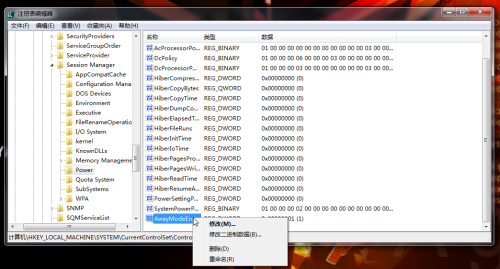
regedit 開啟登錄編輯器。HKEY_LOCAL_MACHINE\SYSTEM\CurrentControlSet\Control\Session Manager\Power1 (十六進位)。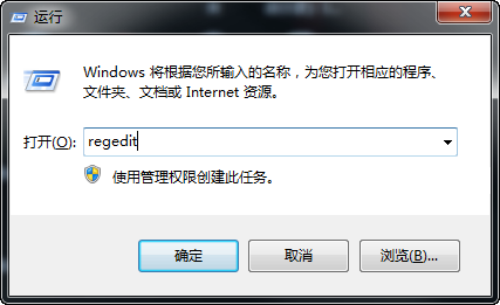
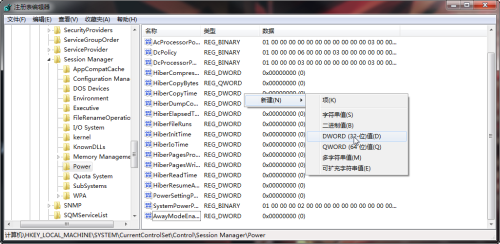
啟動下載任務後選擇「睡眠」,系統進入離開模式持續下載。若不需此功能,刪除 AwayModeEnabled 值即可恢復預設睡眠行為。
注意:修改登錄有風險,操作前建議備份登錄,動手能力不足者請謹慎嘗試。
筆電無光碟機也能裝 Windows 7:外接硬碟安裝完整教學
啟用 Windows 7 內建 Administrator 帳戶與建立自訂帳號
Win7 Windows Update 更新完成不自動重開機:群組原則「已登入使用者不自動重新啟動」
Win7 下 Tab 鍵實用技巧大全:切換焦點、重命名、切換視窗/分頁、命令列自動完成、輸入法翻頁、PS 隱藏面板、程式碼縮排
Win7 不斷重開機修復無效?進階啟動修復、系統還原、重灌三步驟救援
Win7 安裝時避開 200MB 隱藏分區:選擇「格式化」現有分區而非「新建/刪除」